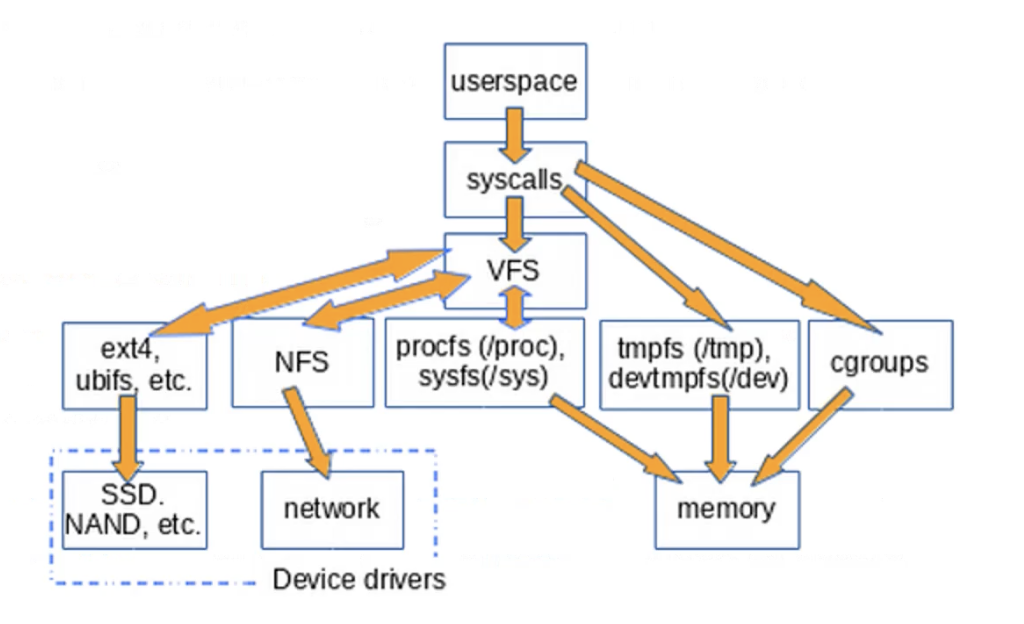
14: FS Design
File System
Def. File System: a layer of OS that transforms block interface of disks (or other block devices) into files, directories, etc…
Components:
- naming: interface to find files by name, not by blocks
- disk management: collecting disk blocks into files
- protection: layers to keep data secure
- reliability/durability: keeping of files durable despite crashes, media failures, attacks, etc…
Disk Management Policies
- basic entities on a disk;
- file: user-visible group of blocks arranged sequentially in logical space
- directory: user-visible index mapping names to files
- access disk as linear array of sectors, two options:
- identify sectors as vectors [cylinder, surface, sector], sort in cylinder-major order
- logical Block Addressing (LBA, 逻辑块寻址): every sector has integer address from zero up to max number of sectors
- controller translates from address \(\Rightarrow\) physical position
- first case: OS/BIOS must deal with bad sectors
- second case: hardware shields OS from structure of disk
- need way to track free disk blocks
- link free blocks together \(\Rightarrow\) too slow today
- use bitmap to represent free space on disk
- need way to structure files: file header
- track which blocks belong at which offsets within the logical file structure
- optimize placement of files’ disk blocks to match access and usage patterns
File
Def. File: named permanent storage. Contain:
- data: blocks on disk somewhere
- metadata:
- owner, size, last opened, …
- access rights
- R, W, X
- owner, group, other (in Unix systems)
- access control list in Windows system
Directory
Def. Directory: basically a hierarchical structure. Contain
- files
- directories: a link to another entries
Conventions of directory:
- root directory
- home directory
- absolute path
- relative path
Def. Volume: a collection of physical storage resources that form a logical storage device. Could be a part of or many physical devices.
Def. Mount: an operation that creates a mapping from some path in the existing file system to the root directory of the mounted volume’s file system.
Designing a File System
- durable data store
- disks performance
- open before read/write
- can perform protection checks and look up where the actual file resource are
- size is determined as they used
- can write (or read zeros) to expand the file
- start small and grow, need to make room
- organized into directories
- need to allocate/free blocks
inode
Def. An inode is a data structure on a filesystem on Linux and other Unix-like operating systems that stores all the information about a file except its name and its actual data.
Each file has exactly one corresponding one inode?
- true for most traditional Unix-like filesystems
- no true with hard links
When a file is copied - a new inode when a file is moved - nothing changed (unless to another filesystem)
How many inodes in Linux?For 32-bit inode number, it’s \(2^{32}\). It also configurable in many file systems
Typical File Systems
- FAT (Microsoft File Allocation Table), 1970s.
- extremely simple index structure: a linked list.
- still widely used in devices like flash memory sticks and digital cameras
- FFS (Unix Fast File System), 1980s.
- tree-based multilevel index to improve random access efficiency.
- uses a collection of locality heuristics to get good spatial locality.
- EXT2 and EXT3 are based on FFS.
- NTFS (Microsoft NewTechnology File System): 1990s.
- more flexible tree structure.
- mainstream file system on MS.
- it’s representative to EXT4, XFS, and Apple’s Hierarchical File Systems (HFS and HFS+).
How do we convert a file name to the file number?
Directory Structure
- Directory is treated as a file with a list of
<file name: file number>mappings - The file number of the root directory is agreed ahead of time (in many Unix FSs. it’s 2).
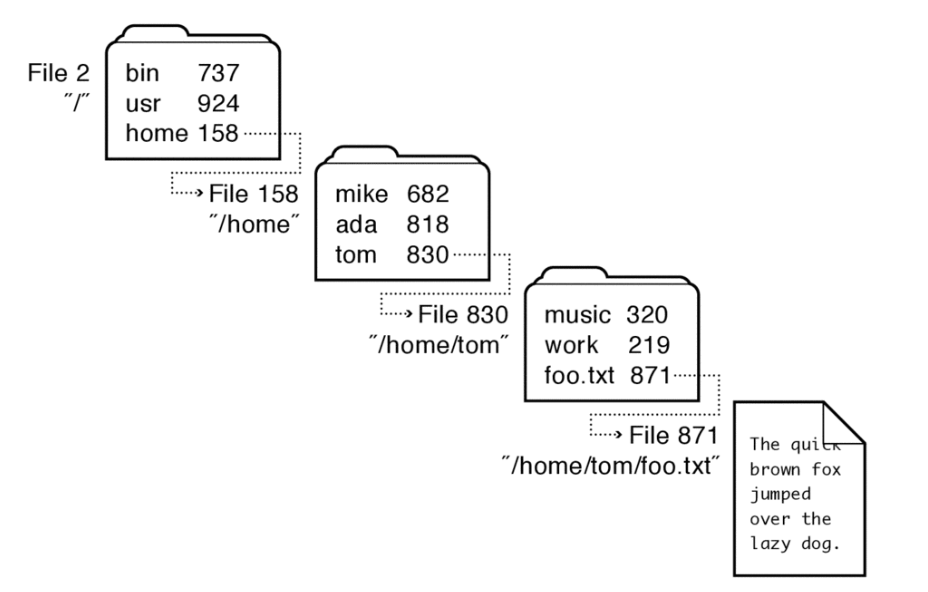
- Stored in files, can be read, but typically don’t
- System calls to access directories
open/creattraverse the structuremkdir/rmdiradd/remove entrieslink/unlink- Link existing file to a directory
- Not in FAT!
- Forms a DAG
- Link existing file to a directory
- When can file be deleted?
- Maintain re-count of links to the file.
- Delete after the last reference is gone.
- libc support
DIR * opendir(const char *dirname)struct dirent * readdir(DIR *dirstream)int readdir_r(DIR *dirstream, struct dirent *entry, struct dirent **result)
Directory Internals
Early implementations simply stored linear lists of <file name, file number> in directory files.
- Free spaces are for new entries. Note: files can be added/deleted.
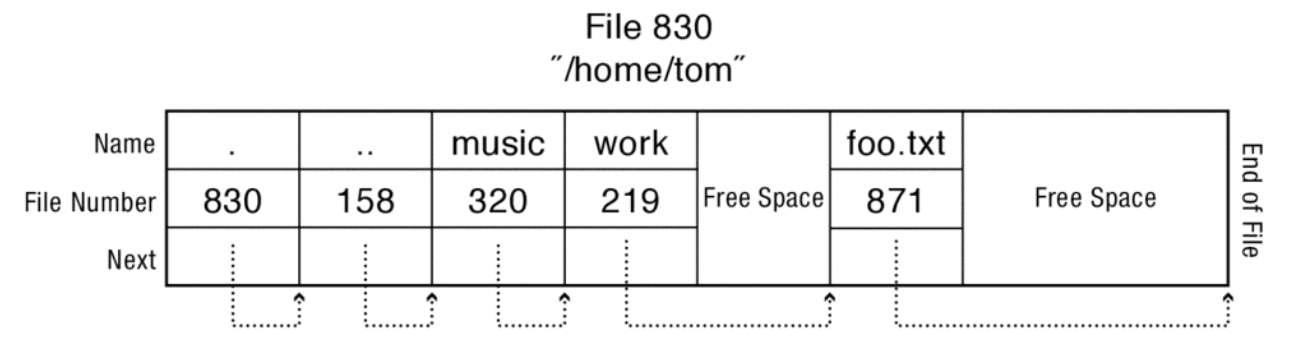
Works fine in most cases. But when there are thousands of files in a directory. The access could be slow!
其中
.是当级目录,..是上级目录
Modern FSs (Linux XFS, Microsoft NTFS, and Oracle ZFS) organize directory’s contents as a tree.
- B/B+ tree: fast lookup, insert, and removal.
- Names are first hashed into a key, which is used to find the file number in the tree.
Directory Structure Access Cost
How many disk accesses to resolve /my/book/count?
- Read in file header for root (fixed spot on disk)
- Read in first data block for root
- Table of file name/index pairs. Search linearly - ok since directories typically very small
- Read in file header for
my - Read in first data block for
my; search forbook - Read in file header for
book - Read in first data block for
book; search forcount - Read in file header for
count
Current working directory: per-address-space pointer to a directory (inode) used for resolving file names
- Allow user to specify relative filename instead of absolute path
Hard Link
lncommand -link()- It creates another name in the directory you are creating the link to, and refers it to the same inode number of the original file.
- OS maintains a reference count for each inode
When shall I use hard link?
- I don’t want to increase inode number
- I want the linked file/directory keep working even when the original file/directory is deleted
- version control
Soft Link
ln -scommand - soft (or symbolic)link()- A special type of file (as against regular file/dir) whose contents are the pathname of the linked-to file.
When shall I use soft link?
- I want to link to a directory. Using hard link to directory might result in cycle in the directory tree.
- I want to link to files in other disk partitions. Because inode numbers are only unique within a particular file system, not across file systems.
- shortcuts (快捷访问)
How do we locate storage block based on file number?
FAT (File Allocation Table)
- FAT is a linked list as 1-1 map with blocks
- represented as a list of 32-bit entries
- each entry in FAT contains a pointer to the next FAT entry of the same file
- where is FAT stored?
- on disk, on boot cache in memory, second (backup) copy on disk
- free space: FAT free list, i.e.,
FAT[i] = 0(i-th block is free space) - locality (storing a file in sequential blocks) is important for fast I/O
- sequential I/O is much faster than random I/O
- imagine you want to append 100 MB to a 200 MB file, FS cannot guarantee they are stored sequential
How to ensure good locality heuristics in FAT?
- simple strategy:
next fit, i.e, scans sequentially through the FAT starting from the last entry that was allocated and return the next free entry- still, there will be increasing fragment
- defragmentation tool: read files and rewrite them to new locations with better locality
- READ: just get block by block with FAT
- WRITE
- get blocks from free list
- linking them into a file
- format a disk
- zero the blocks, link up the FAT free list
- quick format
- link up the FAT free list
Issues
- poor locality: there will be fragmentation
- poor random access: need to traverse the file’s FAT entries till the block is reached
- file metadata stored in directory entries, therefore being limited
- only has file’s name, size, and creation time, but cannot specify the file’s owner or group
- limitations on volume and file size
- with top 4 bits reserved.
- \(2^{28}\) blocks \(\times\) \(4\) KB block size
- large block size
- file size is encoded in \(32\) bits, so less than \(4\) GB
- no support for hard links, hard to maintain a link count (not use inode)
Unix File System (Fast File System FFS)
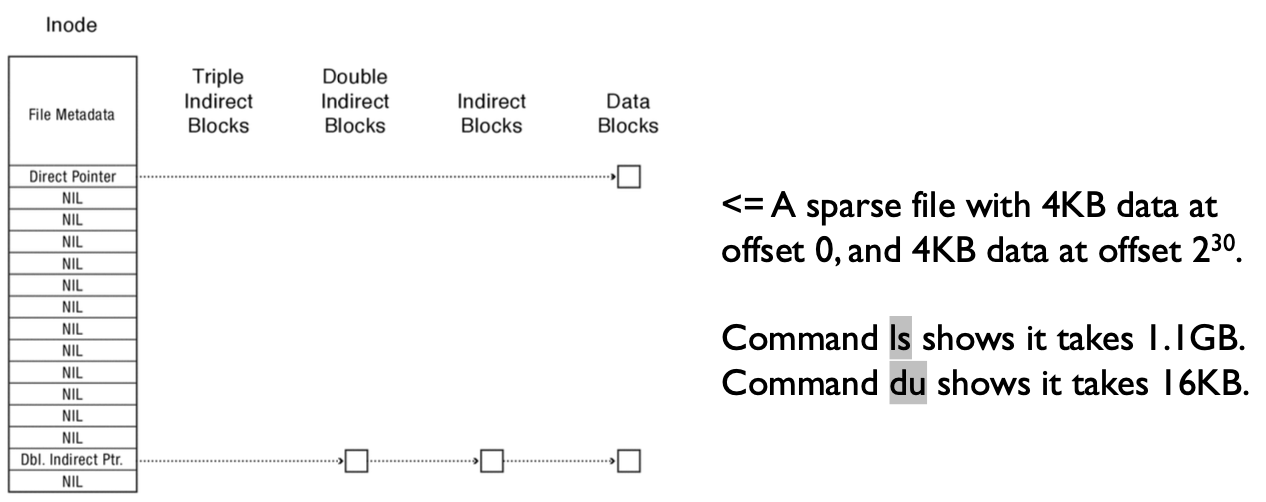
File Number is index into inode arrays.
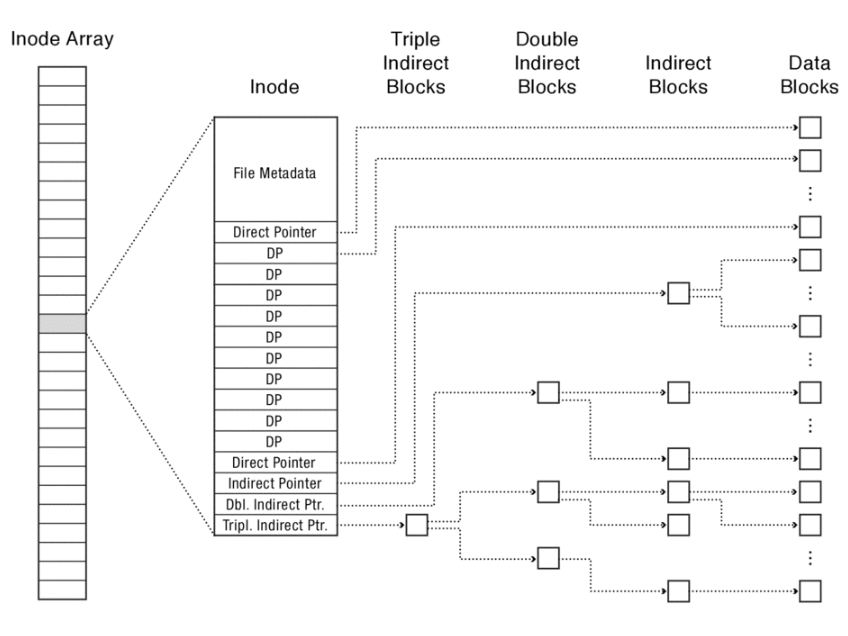
Data block’s size is \(4\) KB
Indirect pointers: point to a disk block containing only pointers
\(4\) KB blocks \(\Rightarrow\) \(1024\) ptrs (each pointer with \(4\) bytes size)
- indirect pointer \(\Rightarrow\) \(4\) MB
- double indirect pointer \(\Rightarrow\) \(4\)GB
- triple indirect pointer \(\Rightarrow\) \(4\)TB
The maximal file size is \(4 \text{KB} \times 12 + 4 \text{MB} + 4 \text{GB} + 4 \text{TB}\) The maximal disk size is \(2^{32} \times 4 \text{KB} = 16 \text{TB}\)
Characteristics:
- tree structure
- high degree: the FFS tree uses internal nodes with many children.
- fixed structure
- asymmetric
FFS can support sparse files, in which one or more ranges of empty space are surrounded by file data. Those empty space shall not consume disk space.
Pros
- efficient storage for both small and large files
- locality for both small and large files
- locality for metadata and data
- no defragmentation necessary
Cons
- inefficient for tiny files (a 1 byte file requires both an inode and a data block)
- inefficient encoding when file is mostly contiguous on disk
- need to reserve 10-20% of free space to prevent fragmentation
Free Space Management
- FFS allocates a bitmap with one bit per storage block. The i-th bit in the bitmap indicates whether the i-th blocks is free or in use
- the position of FFS’s bitmap is fixed when the file system is formatted. So it is easy to find the part of the bitmap that identifies free blocks near any location of interest
Locality Heuristics
- block group placement: FFS places data to optimize for the common case where a file’s data blocks, a file’s data and metadata, and different files from the same directory are accessed together
- files in the same directory are placed in the same block group
- the same for the “directory file” as well, i.e., when a new file is created, find an inode number within the block where its directory resides and give it to the file
- but don’t put the directory and its sub-directory together
- First-Free allocation of new file blocks
- files in the same directory are placed in the same block group
- reserved space: FFS reserves some fraction of the disk’s space (e.g., 10%) and presents a slightly reduced disk size to applications
- when disk is full, there’s little opportunity for file system to optimize locality
- sacrifices a little disk capacity for better locality thus reduced seek times
New Technology File System (NTFS)
Block size variable
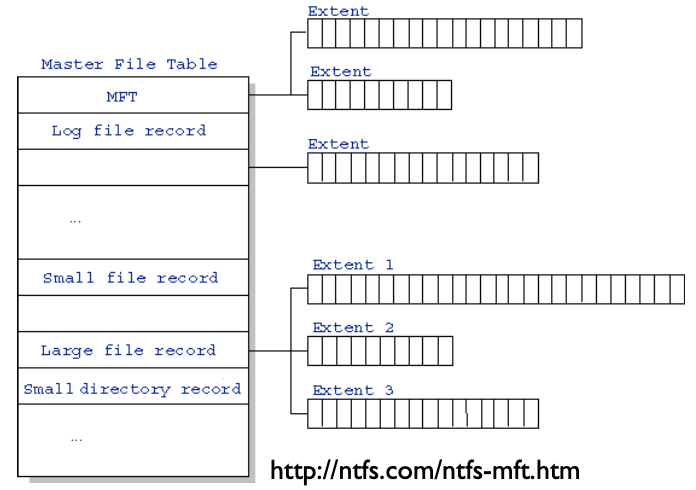
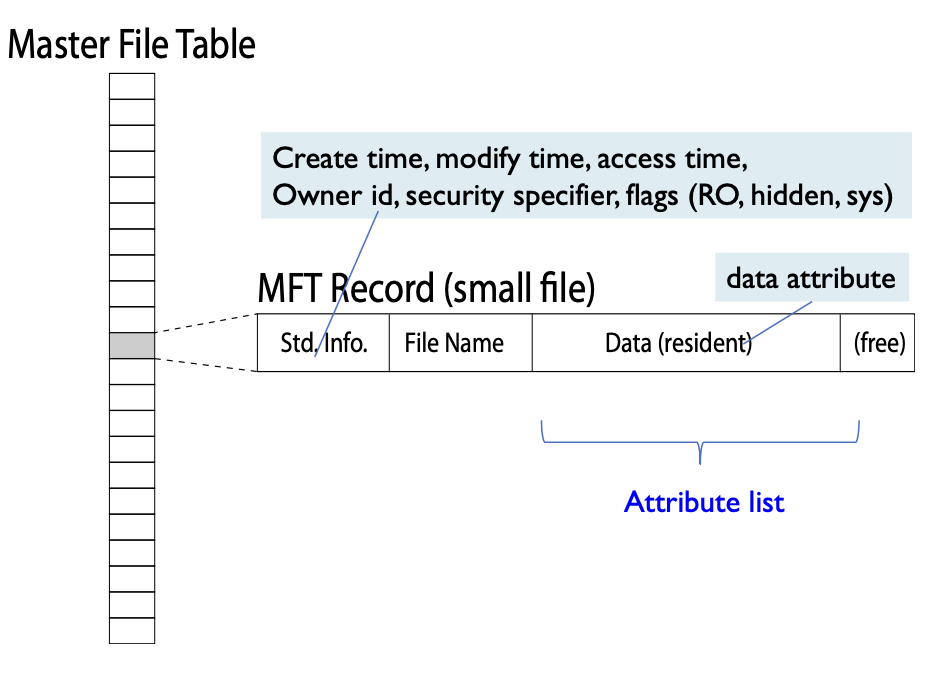
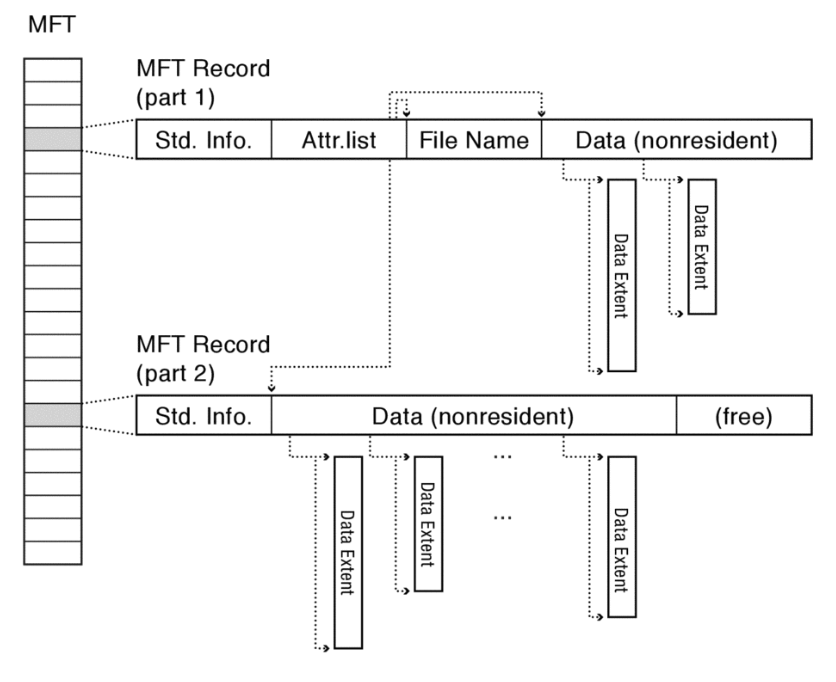
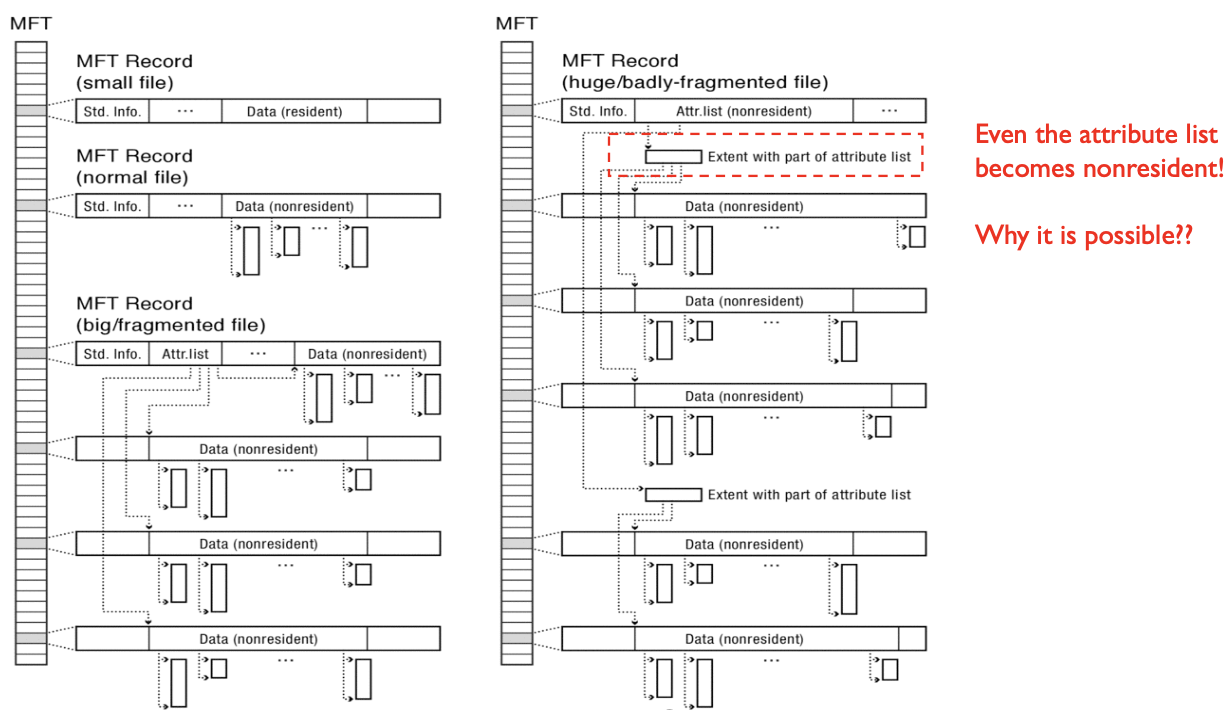
Def. Master File Table
- database with flexible \(1\)KB entries for metadata/data
- variable-sized attribute records (data or metadata)
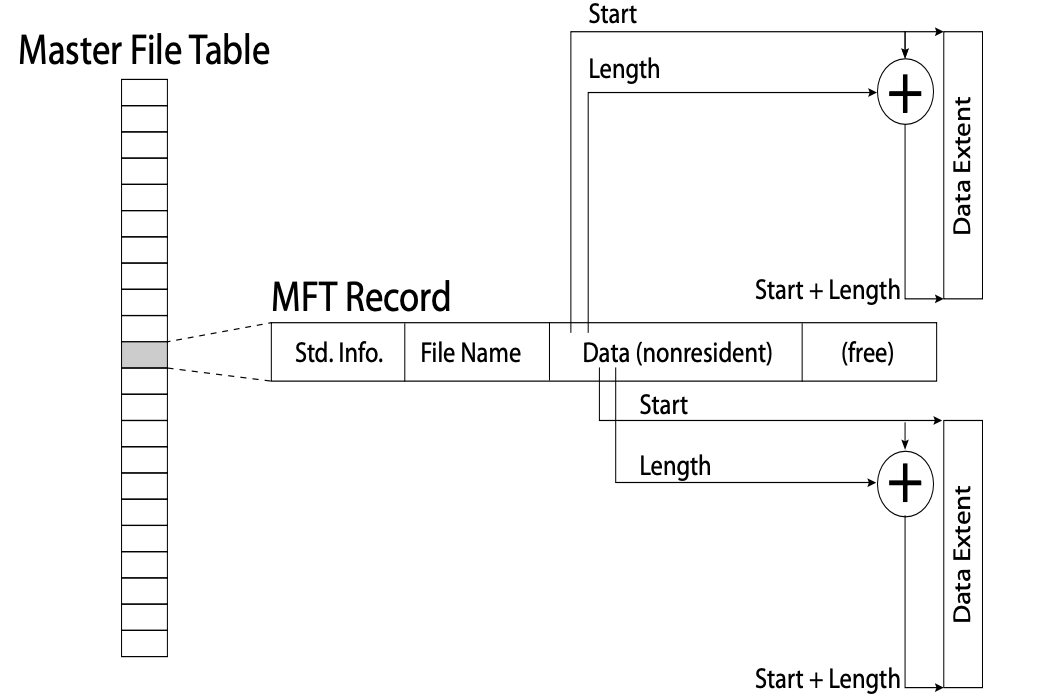
- extend with variable depth tree (non-resident attribute, 非常驻属性)
Extents – variable length contiguous regions
- block pointers cover runs of blocks
Journal for reliability
Virtual File System (VFS)