2: Boot, Process, Kernel
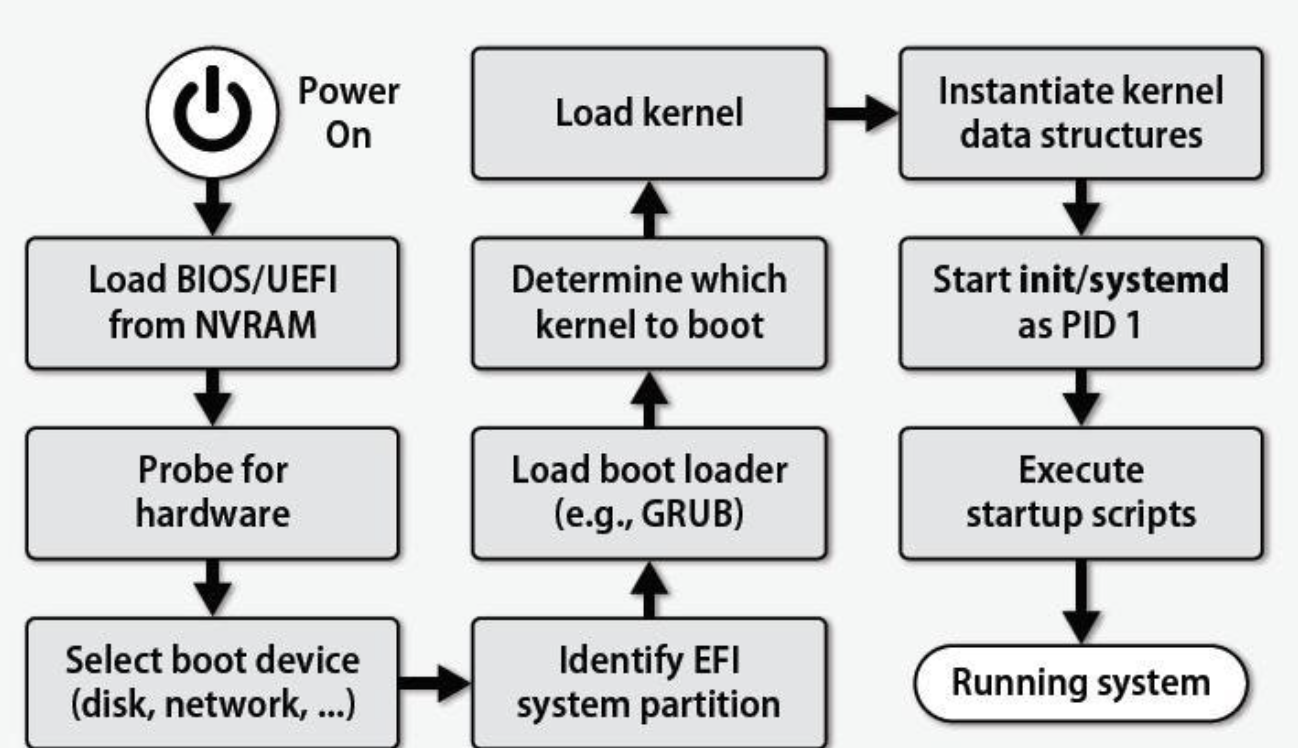
Basic Input Output System
BIOS is a firmware, stored on ROM (read only memory) on motherboard.
- Power-on self-test diagnostic
- Identify attached hardware and initialize their states
- Build HW description for advanced configuration and power interface (ACPI)
- Load a bootloader from disk to memory (usually the first disk sector \(512\) bytes)
- Transfer the control to the bootloader (setting
%cs%and%ip)
Bootloader
Bootloader is a software, and a part of OS.
- Switch from real mode to protected mode
- Check if kernel image is ok.
- Loading kernel from disk to memory.
- Transfer the control to real OS.
Kernel image is the core of OS.
Real model and protected mode are different status the CPU works at
Case Study: Booting of JOS
[f000:fff0] 0xffff0:ljmp $0xf000, $0xe05b- The first instruction run by CPU
- Observed through GDB
- What we learned from it?
- The IMB PC starts executing at physical address
0x000ffff0, which is at the very top of the \(64\) KB area reserved for the ROM BIOS. - The PC starts executing with
CS = 0xf000andIP = 0xfff0 - The first instruction to be executed is a
jmpinstruction, which jumps to the segmented addressCS = 0xf000andIP = 0xe05b
- The IMB PC starts executing at physical address
在 x86 架构中,CPU 在启动时会从固定地址(通常是
0xffff0)开始执行代码。这个地址位于 BIOS 的内存区域,通常包含一条ljmp指令,用于跳转到实际的 BIOS 初始化代码位置。Instruction 是指 CPU 执行的机器语言命令,它是计算机程序的最基本组成部分。指令告诉 CPU 应该执行什么操作,比如数据传输、算术运算、逻辑运算或控制程序流程。每条指令通常由两部分组成
- Opcode(操作码):指定要执行的操作类型,例如加法、跳转等。
- Operands(操作数):提供操作所需的数据或地址。
Unified Extensible Firmware Interface (UEFI)
A successor of BIOS
- It’s faster
- It has filesystem support
- It can be stored in various places: flash memory on motherboard, hard drive, or even network share
- It supports more input such as mouse
- It has secure boot
- It has better UI
- Somehow it’s more like a ”mini OS”
Process
Def. Process: the execution of an application program with restricted rights.
- Protection from each other; OS protected from processes
- Owns dedicated address space
- Contexts of file descriptor, filesystem, etc..
- One or many threads
在操作系统中,Contexts(上下文)指的是与进程相关的所有状态信息,这些信息使得操作系统能够正确地管理和调度进程。具体到 file descriptor、filesystem 等,指的是进程在文件操作和文件系统方面的上下文信息。
How process differs from program?
- Process is an instance of program, like an object is an instance of a class in OOP
- A program can have zero, one, or many processes executing it
Process Control Block
Def. Process control block: a data structure used by Linux to keep track of a process execution. It includes
- Process ID (PID)
- Process state (running, waiting, ready..)
- Process priority
- Program counter
- Memory related information
- Register information
- I/O status information (file descriptor, I/O devices..)
- Accounting information
Process in Memory
There are \(5\) parts of a process in memory. From high address to low address (this address is virtual), they are stack, heap, uninitialized data (.bss), initialized data (.data), code (.text).
For example, the following code initialize a process.
1 | |
In Linux, we use
readelfcommand to checkout what’s in an executable
How to virtual
The basic model of CPU virtualization: run one process for a little while, then run another one, and so forth. But this model has two significant challenges.
- Performance. How to virtualize without adding excessive overhead to the system
- Control (isolation)
- OS must take control whenever it wants; otherwise a process can run forever
- OS must control how certain resources can be accessed by processes (evil processes)
- A straightforward way to address this; let OS take charge of each instruction of process
Above contents mean we allow most instructions direct run on CPU, but for sensitive instructions, we let them go through OS. This means we need to limit direct execution.
Limited Direct Execution
So, how to limit direct execution? Here are two ways.
- Restricted operations
- Sensitive operations must go to OS, so the latter can guarantee its legality (reject, accept, schedule, etc..)
- Inter-process switching
- Voluntary switching: system calls,
wait(), etc.. - Involuntary switching: timer interrupt
- Voluntary switching: system calls,
Dual Mode
But, how to implement restricted operations or inter-process switching? Is software alone enough? We need hardware-assisted (user mode and kernel mode)isolation and protection.
What hardware needs to provide?
- Privileged instructions
- Memory protection
- Timer interrupts
- Safe mode transfer
Privileged Instructions
Def. Privileged instructions are available in kernel mode but not user mode. Any instructions that could affect other processors are likely to be privileged.
| Privileged Instructions | Non-privileged Instructions |
|---|---|
| I/O read/write | Performing arithmetic operation |
| Context switch | Call a function |
| Changing privilege level | Reading status of processor |
| Set system time | Read system time |
What if apps need those privileged instructions?
What if apps executes a privileged instruction without permission?
- Processor detects it in its hardware logic, and throws an exception
- Process halted, OS takes over
Memory Protection
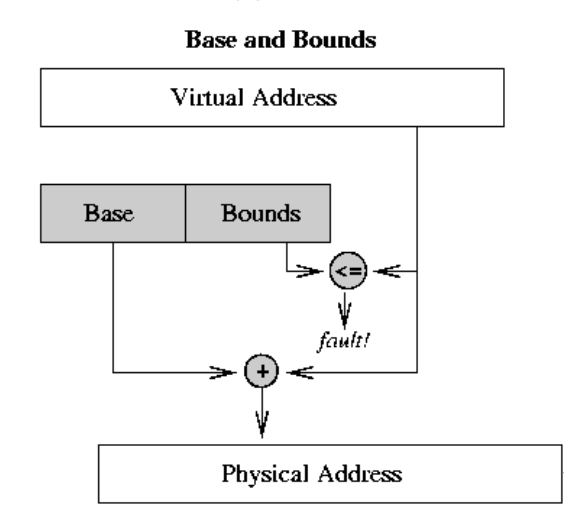
- Segmentation
- Base and bounds registers
- Every memory access is checked on those registers
- A block copy needs to check each of the data address
- Kernel mode bypass this check
The disadvantages of this approach
- No expandable heap and stack
- No memory sharing
- Memory fragmentation
- Paging
- Every memory address a process see is discontinuously mapped to a physical address in memory
- Involves extensive software-hardware cooperation
How to translate virtual address to physical address is determined by OS in kernel mode
The actual translation process and permission check in done by CPU
Time Interrupts
Def. Time interrupts is a way for OS to regain the control to the CPU
- An illusion: the program has the full control of CPU
- Otherwise, it can execute an infinite loop
- Hardware timer can only be reset in kernel mode
After timer interrupts, the OS schedule another process (could be the same one being interrupted) to run
Current Privilege Level (CPL)
x86 architecture uses lower \(2\)-bits in the CS (CS) Segment register (referred to as the current privilege level bits). Yet most OSes only use level \(0\) (kernel mode) and level \(3\) (user mode)
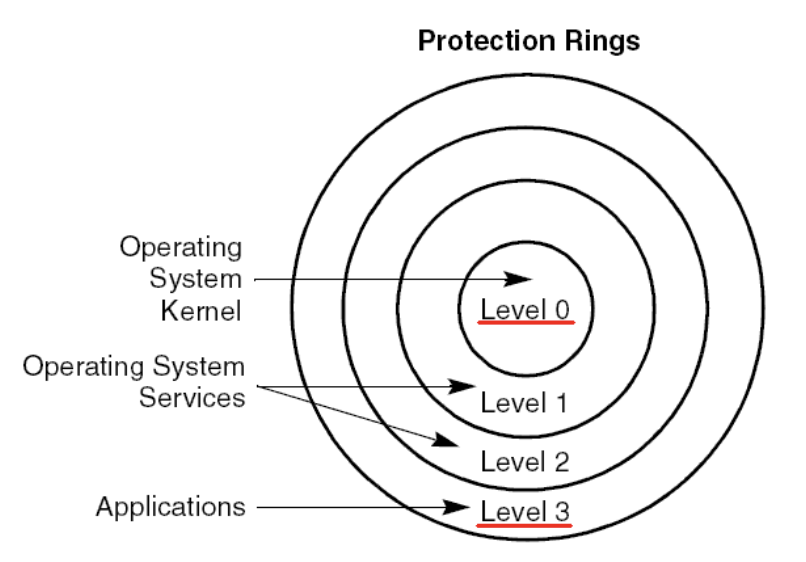
How to switch between user and kernel modes?
CPL &= 0x0CPL &= 0x3CPL |= 0x0CPL |= 0x3CPL &= 0xfffffffcCPL |= 0xfffffffc
Some Questions
Does user code always run in user process?
Does user code always run in user mode?
Does OS code always run in system process?
Does OS code always run in kernel mode?
How does code/CPU know if it’s in user or kernel mode?