Computer Networking, A Top-Down Approach, 5th Edition
Principles of network applications
Application architectures
Three Kinds: - Peer to Peer - Client-Server - hybrid of P2P and Client-Server
Client-Server
Client-Server architecture has following characteristics: - Server is always-on host; - Server has a permanent IP address; - Clients do not communicate with each other directly.
clients 之间通过 server 交流。
Pure P2P
In P2P architecture, there is no always-on server, what’s more, arbitrary end systems communicate directly.
Hybrid of Client-Server and P2P
As the name suggests, this architecture is implemented with Client-Server and P2P.
There are two important instance, Skype and QQ - Skype: a voice-over-IP P2P application. If a host A wants to voice another host B, he will get B’s IP address from a server. And then they communicate with each other directly. - QQ: a chat-over-IP P2P application.
clients 会给 server 提交自己的 IP address。
Client-Server 部分
- 用户登录、查找好友、获取在线状态等操作都需要通过集中服务器完成。
- 服务器维护所有用户的索引和状态信息,起到“中介”作用。
P2P 部分
- 当用户之间需要发送即时消息或文件时,实际数据传输可以直接在用户之间进行,不经过服务器。
- 这样可以减轻服务器压力,提高传输效率。
Processes Communicating
Process is a program controlled by app developer, running within a host. Within a same host, two processes communicate with each other by inter-process communication. Between two hosts, processes communicate with each other by exchanging messages. Generally speaking, there are two kinds of processes, they are client process and server process. Client process initializes a communication, and server process waits to be contacted.
Sockets
A door between application layer and transport layer.
Addressing Processes
To receive message, process must have an identifier. Identifier includes both IP address and port numbers associated with process on host.
App-layer Protocol Defines
What does an app-layer protocol define? - Type of message exchanged; - Message syntax: what fields in messages and how fields are delineated; - Message semantics: meaning of information in fields; - Rules for when and how a process requests and sends messages.
message 类型、语义、语法、传输时间和方式。
Generally speaking, there are two sorts of app-layer protocols, they public-domain protocol and proprietary protocol.
前者公开后者不公开。
What transport service dose an application need?
We can consider four standards to select transport service. - data loss - timing - throughput - security
下面是常见的应用类型其需要的传输层服务:
| Application | Data Loss | Throughput | Time Sensitive |
|---|---|---|---|
| File transfer | No loss | Elastic | No |
| No loss | Elastic | No | |
| Web documents | No loss | Elastic | No |
| Real-time audio/video | Loss-tolerant | Audio: 5kbps-1Mbps Video: 10kbps-5Mbps |
Yes, 100’s msec |
| Stored audio/video | Loss-tolerant | Same as above | Yes, few secs |
| Interactive games | Loss-tolerant | Few kbps up | Yes, 100’s msec |
| Instant messaging | No loss | Elastic | Yes and no |
远程医疗手术系统是 requires no data loss and is highly time-sensitive 实际上,在当今互联网中,语音和视频流量经常通过 TCP 发送,主要原因是防火墙和 NAT(网络地址转换)设备的兼容性和穿透性更好。许多防火墙和 NAT 设备默认只允许 TCP 流量通过,而对 UDP 流量进行限制或直接丢弃。这样做是出于安全性和管理的考虑,因为 TCP 连接有明确的建立和关闭过程,便于追踪和控制,而 UDP 是无连接的,容易被滥用。因此,为了确保语音和视频应用能够在各种网络环境下顺利传输数据,开发者往往选择基于 TCP 协议进行数据传输,即使 UDP 在实时性和低延迟方面更有优势。
下面是常见的应用类型其需要的应用层、传输层协议:
| Application | Application Layer Protocol | Underlying Transport Protocol |
|---|---|---|
| SMTP [RFC 2821] | TCP | |
| Remote terminal access | Telnet [RFC 854] | TCP |
| Web | HTTP [RFC 2616] | TCP |
| File transfer | FTP [RFC 959] | TCP |
| Streaming multimedia | HTTP (e.g., YouTube), RTP [RFC 1889] | TCP or UDP |
| Internet telephony | SIP, RTP, proprietary (e.g., Skype) | Typically UDP |
Web and HTTP
Web pages consist of some objects, each object can be HTML file, Java script and so on. Each object is addressed by a URL, for example, www.someschool.edu/someDept/pic.gif. Among this URL, www.someschool.edu is host name and someDept/pic.gif is path name.
Base HTML-file is the core of a page. It may includes several referenced objects.
HTTP: Hypertext Transfer Protocol
HTTP is Web’s application protocol with Client-Server model. Its transport layer protocol is TCP.
HTTP is stateless, this means server maintains no information of past clients requests. The reason why protocol that maintains state are complex is that if server or client crashes, their views of “state” may be inconsistent, must be reconciled.
需要和后文的 cookie 区分开,cookie 并不和 stateless 的性质相违背,原因是:Cookie 只是让状态在客户端和服务器之间传递,而不是让服务器主动维护状态。
Non-Persistent HTTP
RTT: Round Trip Time
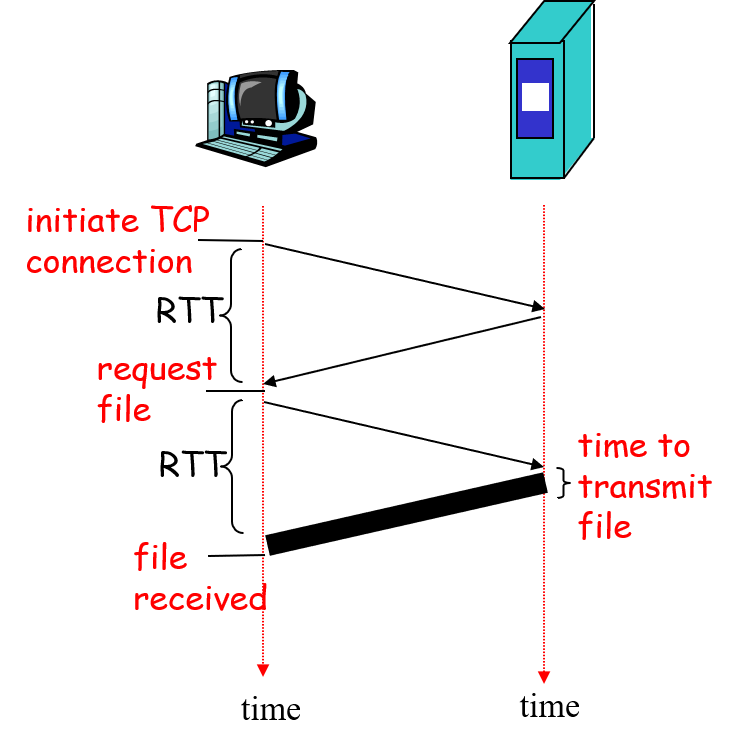
Definition of \(\text{RTT}\): time for a small packet to travel from client to server and back.
From the picture, we can calculate total time. \(\text{total time} = 2 \times \text{RTT} + \text{transmit time}_1\)
Persistent HTTP
Persistent HTTP leaves TCP connection open after sending response. Client sends request as soon as it encounters a referenced object. As little as one RTT for all the referenced objects. \(\text{total time} \approx 3 \times \text{RTT} + \text{transmit time}_1 + \text{transmit time}_2\)
HTTP Message
Two types of HTTP message: request and response. Sent as ASCII text
Request
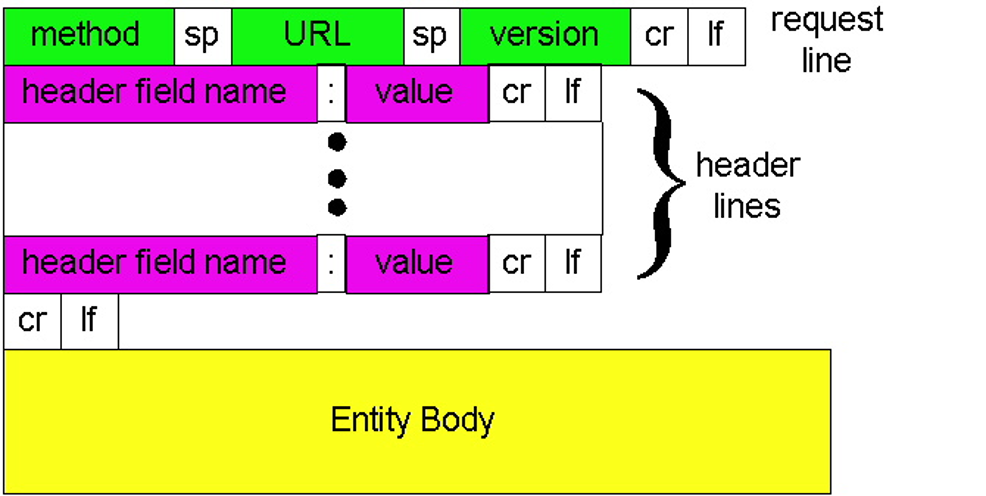
- Request Line
- Method: GET, POST, HEAD; PUT, DELETE;
- POST: Server decides the path;
- PUT: Client decides the path;
- URL: path;
- Version: HTTP version.
- Method: GET, POST, HEAD; PUT, DELETE;
- Header Lines
- Host:
- User-Agent:
- Connection: keep-alive or close;
- Accept-Language: .
- Entity Body:
如果是 keep-alive 则是 persistent connection;如果是 close 则是 non-persistent connection。
Response
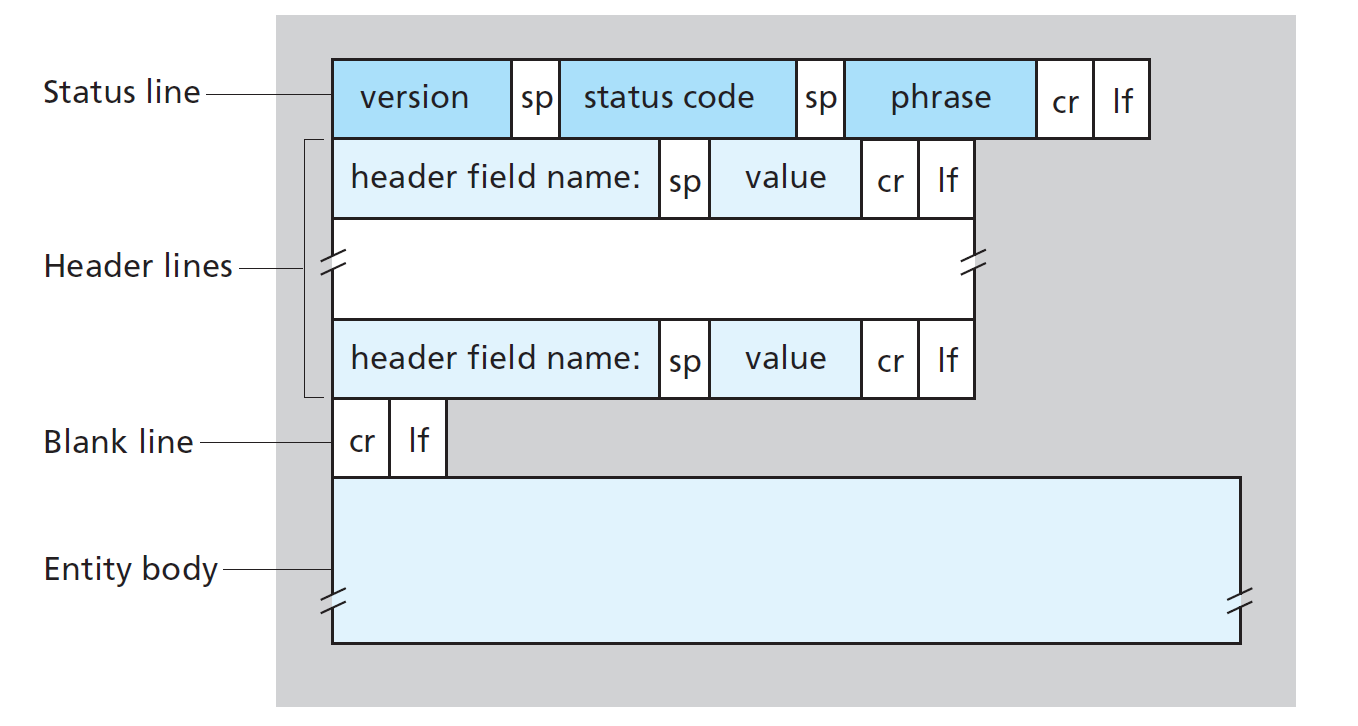
A few sample codes - 200: OK - 301: Moved Permanently - 400: Bad Request - 404: Not Found - 505: HTTP Version Not Supported
User-Server State: Cookies
How to set cookies and use cookies? When a client first initialize HTTP TCP connection, server will set cookies in response message’s Header filed. After that, each request message from same client will take will cookies in request message HEADER filed.
What cookies can bring:
- authorization
- shopping carts
- recommendations
- user session state (Web e-mail)
比如:
- 用户访问电商网站 → 服务器分配并下发
user_idCookie - 用户下单 → 浏览器携带
user_idCookie → 服务器根据user_id更新购买记录 - 用户后续访问 → 服务器通过 Cookie 识别用户,展示其购买历史
Web Caches
Goal: satisfy client request without involving origin server.
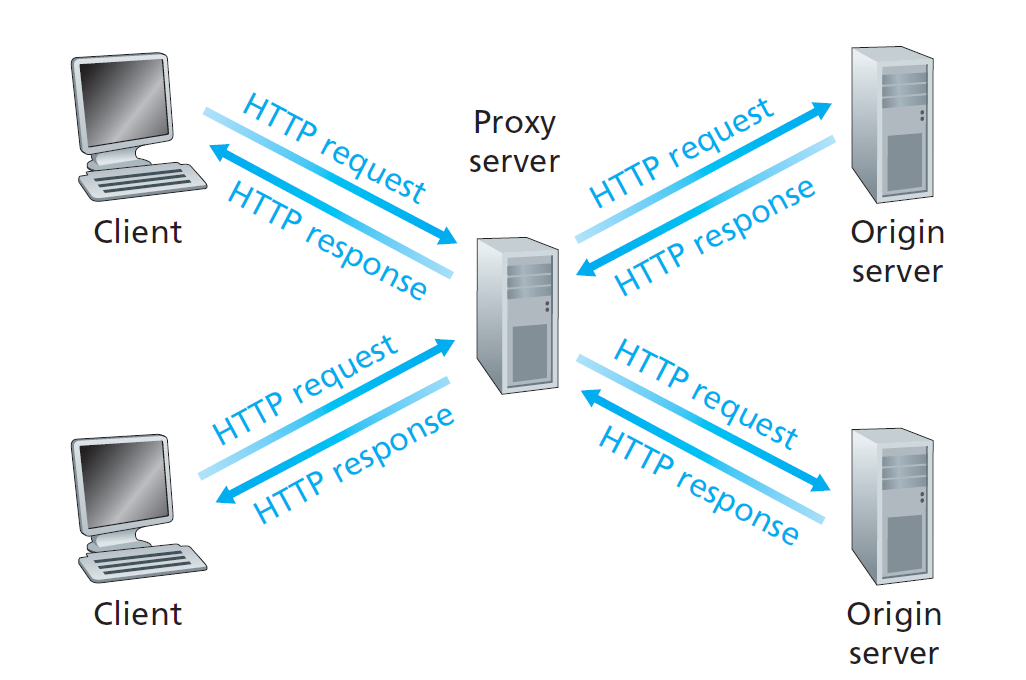
typically cache is installed by ISP.
Why Web caching? - reduce response time for client request - reduce traffic on an institution’s access link. - Internet dense with caches: enables “poor” content providers to effectively deliver content (but so does P2P file sharing)
Conditional GET
Goal: don’t send object if cache has up-to-date cached version
cache: specify date of cached copy in HTTP request: If-modified-since: date server: response contains no object if cached copy is up-to-date: HTTP/1.0 304 Not Modified
FTP: the File Transfer Protocol
Goal: File transfers from/to remote host.
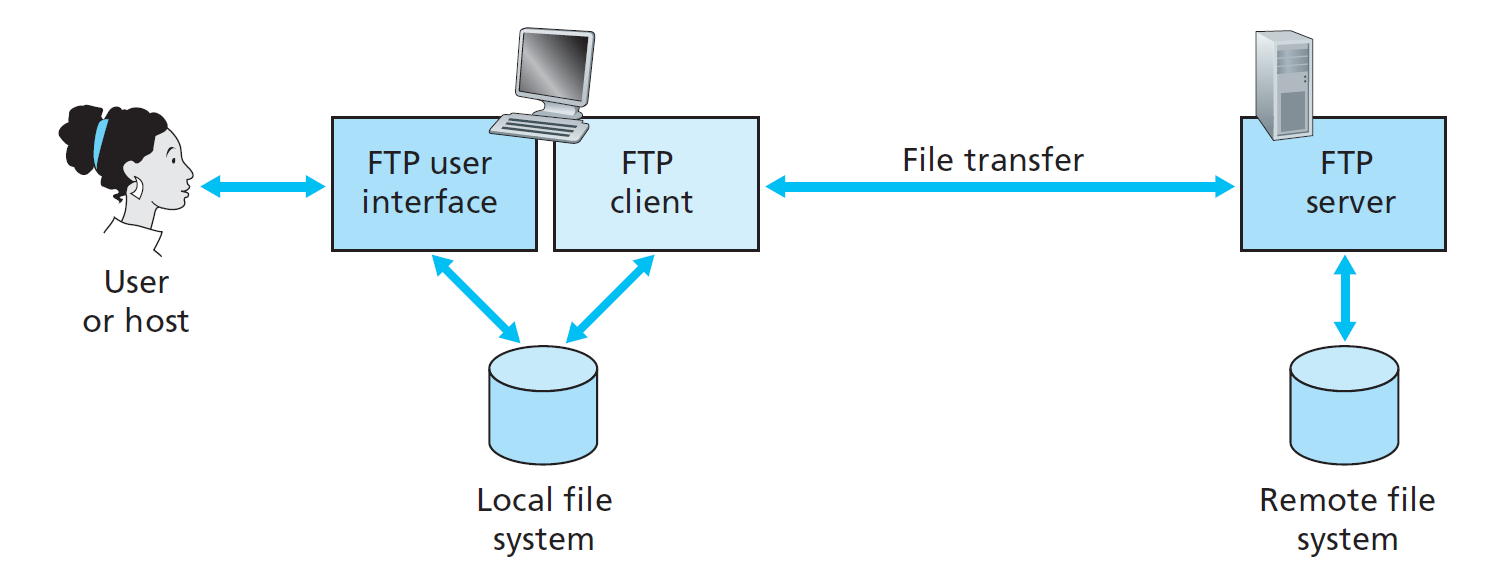
FTP client contacts FTP server at port 21, TCP is transport protocol. When server receives file transfer command, server opens \(2^{nd}\) TCP connection for file to client. After transferring one file, server closes data connection. Server opens another TCP data connection to transfer another file.
这是一种 out-of-band 的协议。
- 带外(Out-of-band) 指的是控制信息和数据内容通过不同的通道进行传输,而不是混合在同一个通道中。
FTP Commands, Responses
Sent as ASCII text, response: status code and phrase.
Sample commands: - USER username; - PASS password; - LIST return list of file in current directory; - RETR filename retrieves (gets) file; - STOR filename stores (puts) file onto remote host.
Sample return codes: - 331 Username OK, password required; - 125 data connection already open; transfer starting; - 425 Can’t open data connection; - 452 Error writing file.
Electronic Mail
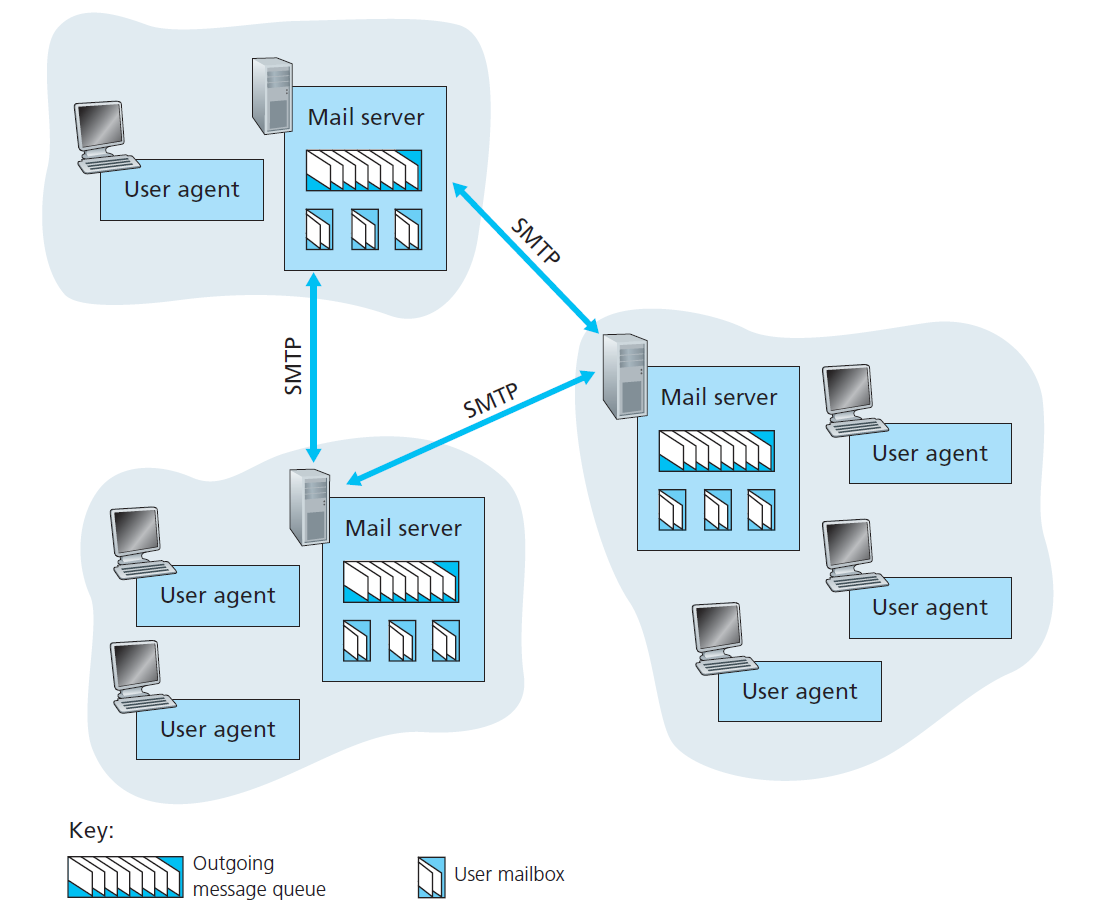
Three Major Components: - user agents; - mail servers; - simple mail transfer protocol: SMTP.
Mail Server - mailbox contains incoming messages for user; - message queue of outgoing (to be sent) mail messages - SMTP protocol between mail servers to send email messages
SMTP: Simple Mail Transfer Protocol
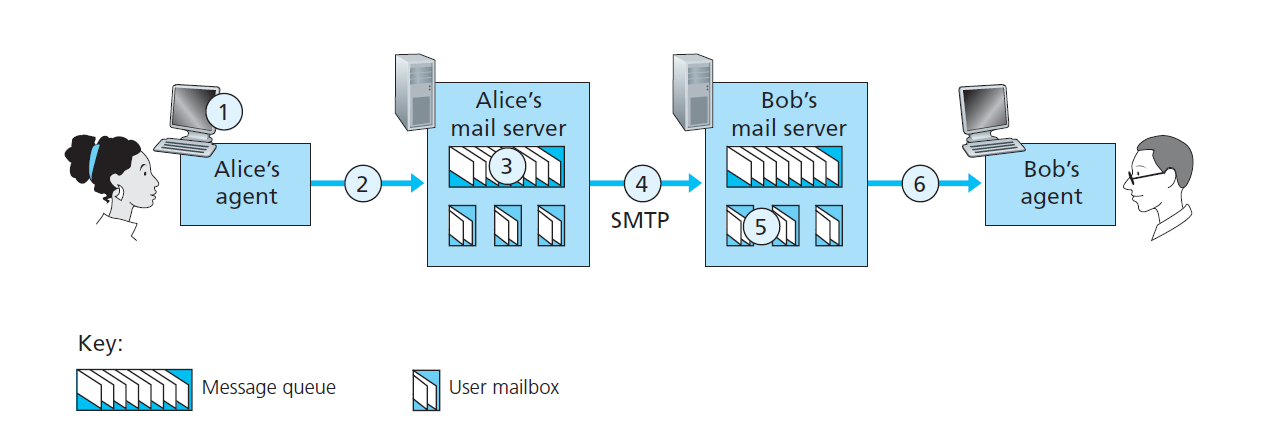
Characteristics: - Uses TCP to reliably transfer email message from client to server, port 25; - Three phases of transfer; - Handshaking (Greeting); - Transfer of Messages; - Closure. - Command/Response interaction; - Commands: ASCII text; - Response: status code and phrase.
What’s more: - SMTP uses persistent connections; - SMTP requires message (header & body) to be in 7-bit ASCII; - SMTP server uses CRLF.CRLF to determine end of message.
Comparison with HTTP - HTTP: pull; SMTP: push - HTTP: each object encapsulated in its own response msg; SMTP: multiple objects sent in multipart msg.
Mail Message Format
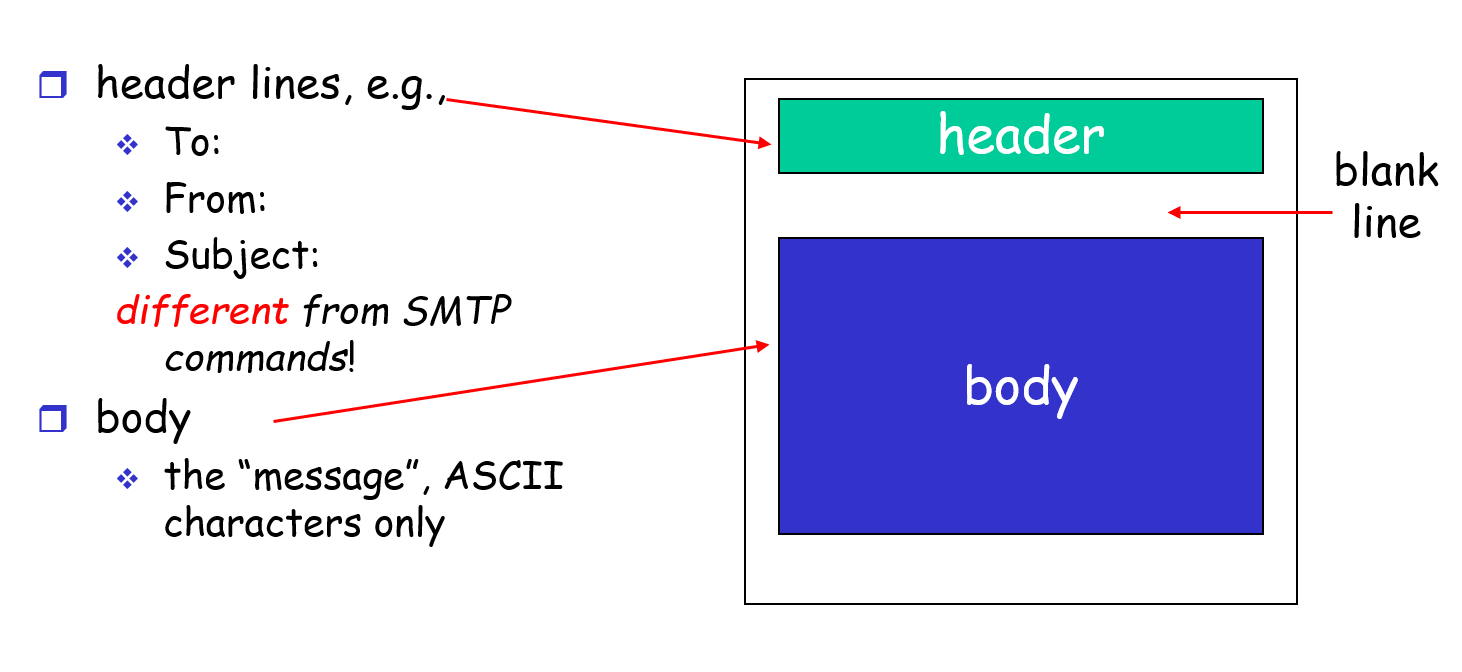
Mail Access Protocols
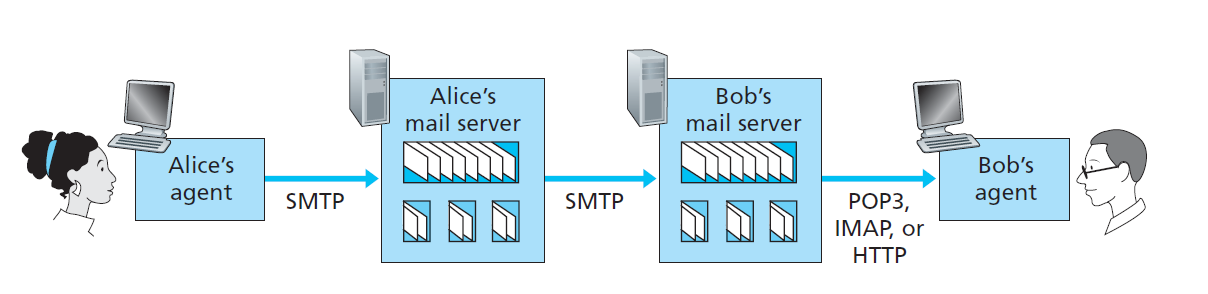
- SMTP: delivery/storage to receiver’s server;
- Mail Access Protocol: retrieval from server.
POP3 Protocol
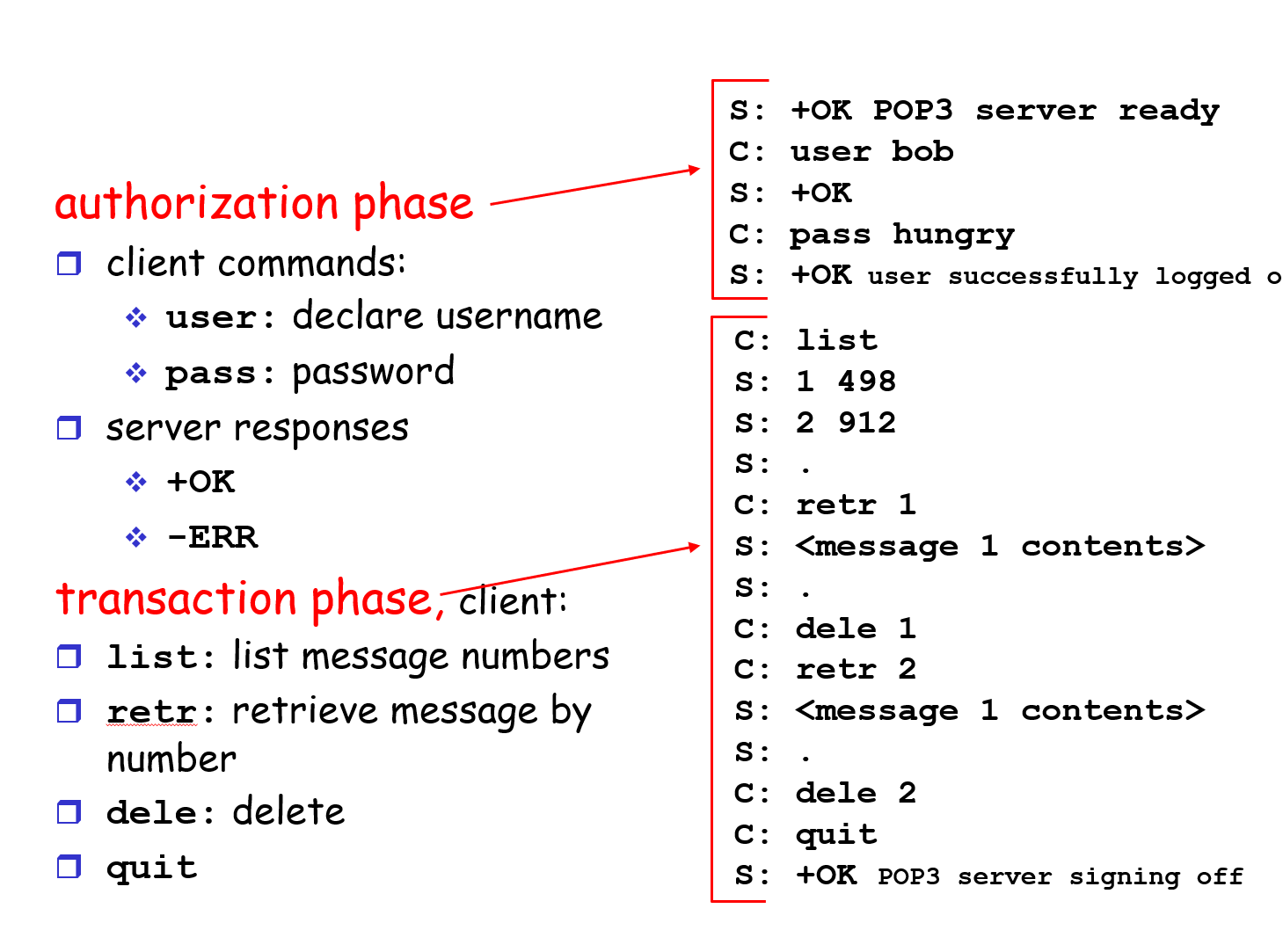
More about POP3: Previous example uses “download and delete” mode. Bob cannot re-read e-mail if he changes client;“Download-and-keep”: copies of messages on different clients; POP3 is stateless across sessions.
| 模式 | 邮件服务器是否保留邮件 | 多终端访问体验 | 适用场景 |
|---|---|---|---|
| download-and-delete | 否 | 仅首台设备可见 | 单一终端、节省空间 |
| download-and-keep | 是 | 多终端均可访问 | 多终端、备份安全 |
IMAP
- Keep all messages in one place: the server;
- Allows user to organize messages in folders;
- IMAP keeps user state across sessions: names of folders and mappings between message IDs and folder name.
DNS: Domain Name System
组织的 Web 服务器和邮件服务器能否拥有相同的主机别名?对应的 RR 类型是什么?
可以。
一个组织的 Web 服务器和邮件服务器完全可以使用同一个主机别名(如 foo.com)。这是因为 DNS 允许为同一个域名设置不同类型的资源记录(Resource Record, RR),分别指向 Web 服务和邮件服务。
- 当用户在浏览器中访问
http://foo.com时,DNS 查询的是该域名的 A 记录(IPv4 地址)或 AAAA 记录(IPv6 地址),用于定位 Web 服务器。 - 当发送邮件到
user@foo.com时,邮件系统会查询该域名的 MX 记录,用于定位邮件服务器。
| 记录类型 | 作用说明 |
|---|---|
| A | 域名到 IPv4 地址(Web 服务器) |
| MX | 域名到邮件服务器主机名(邮件服务) |
Hostname to IP address translation
Distributed, Hierarchical Database
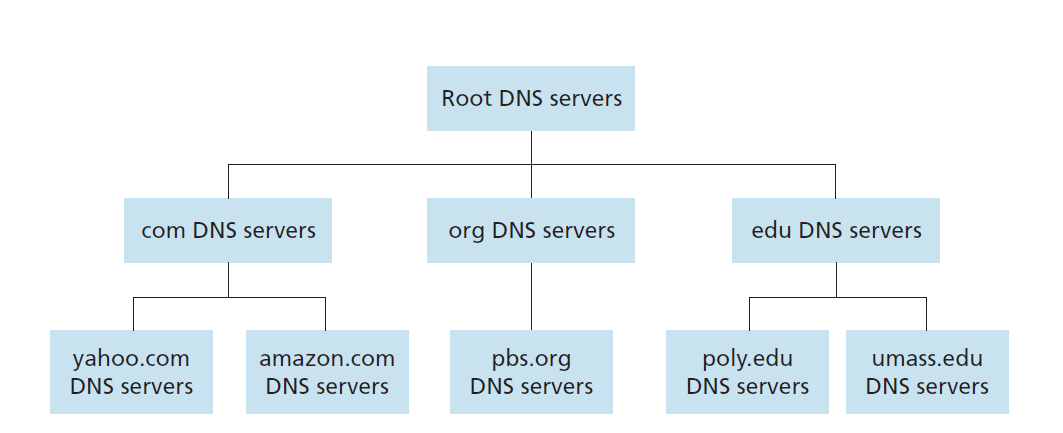
Top-Level Domain (TLD) Servers
- Responsible for com, org, net, edu, etc, and all top-level country domains uk, fr, ca, jp;
- Network Solutions(a company) maintains servers for com TLD;
- Educause(an institution) for edu TLD
Authoritative DNS Servers
Organization’s DNS servers, providing authoritative hostname to IP mappings for organization’s servers (e.g., Web, mail). Can be maintained by organization or service provider.
Local Name Server
- Does not strictly belong to hierarchy;
- Each ISP (residential ISP, company, university) has one;
- When host makes DNS query, query is sent to its local DNS server.
DNS Name Resolution
Iterated Query
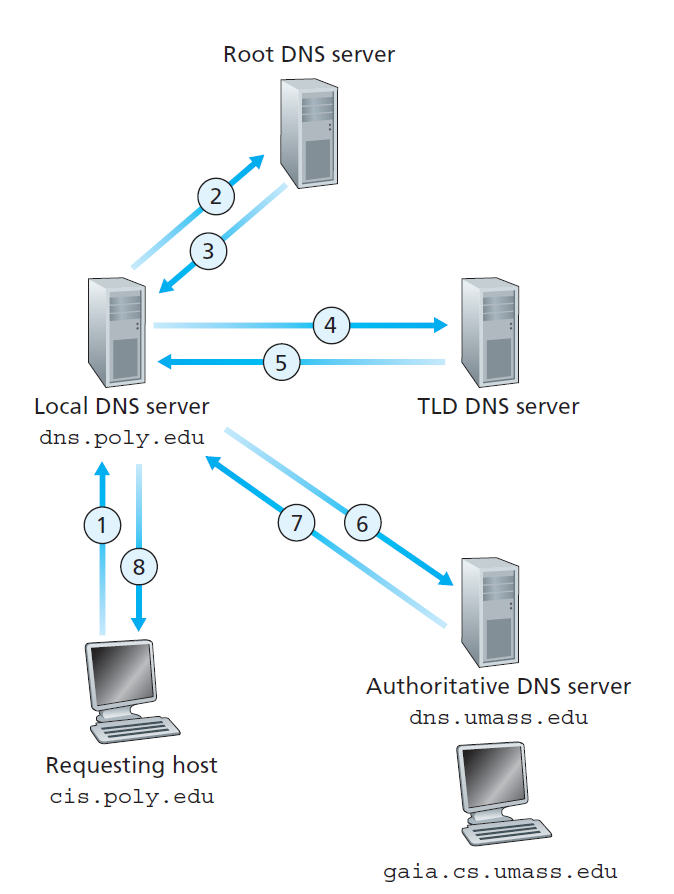
Recursive Query
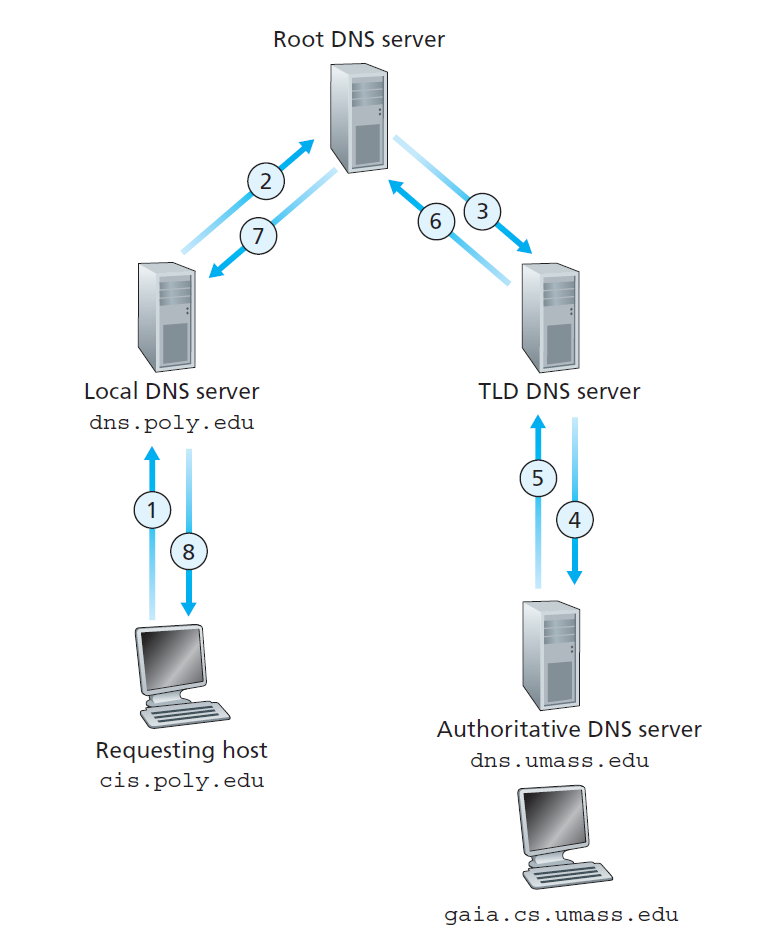
DNS: Caching and Updating Records
- Once (any) name server learns mapping, it caches mapping;
- Cache entries timeout (disappear) after some time;
- TLD servers typically cached in local name servers. Thus root name servers not often visited.
DNS records
DNS: distributed db storing resource records (RR).
RR format: (name, value, type, ttl).
| Type | Name | Value | Description |
|---|---|---|---|
| A | Hostname | IP address | Maps hostname to IP address |
| NS | Domain (e.g., foo.com) |
Hostname of authoritative name server | Specifies authoritative name server for domain |
| CNAME | Alias name | Canonical name | Maps alias to canonical (real) name |
| MX | Domain name | Mail server name | Specifies mail server associated with domain |
DNS Protocol, Messages
DNS protocol : query and reply messages, both with same message format.
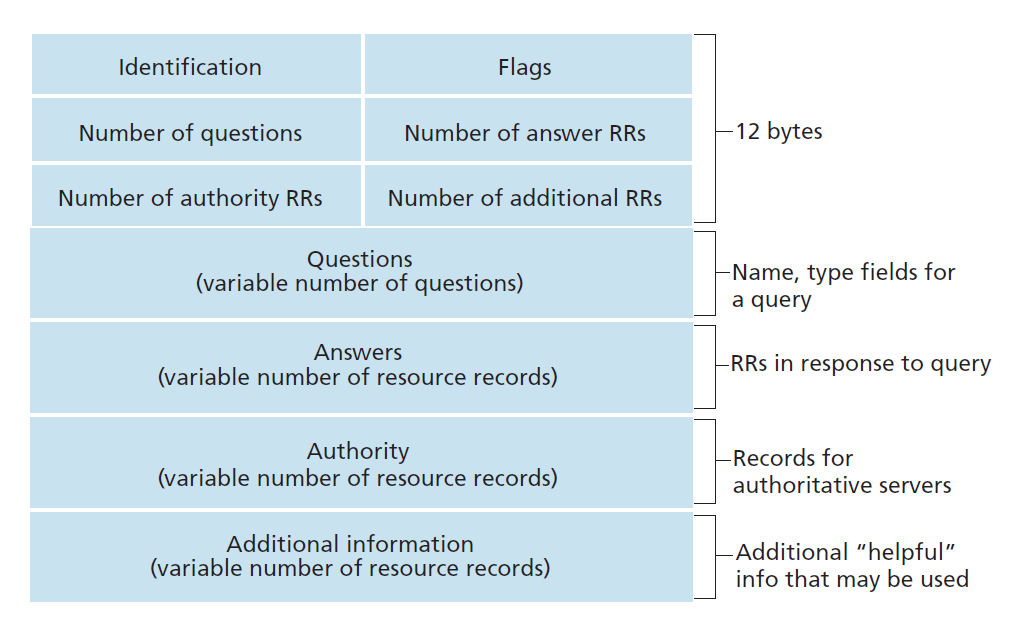
Identification: 16 bit # for query, reply to query uses same #.
Flags: - query or reply; - recursion desired; - recursion available; - reply is authoritative.
P2P applications
Pure P2P Architecture
File Distribution: Server-Client vs P2P
- \(u_s\): server upload bandwidth;
- \(u_i\): peer i upload bandwidth;
- \(d_i\): peer i download bandwidth;
- \(F\): file size.
Question: How much time to distribute file from one server to \(N\) peers?
Answer with Client-Server \[ t_{cs} = \max \left \{\frac{NF}{u_s}, \frac{F}{d_i} \right \} \tag{1} \]
Answer with P2P \[ t_{p2p} = \max \left \{\frac{F}{u_s}, \frac{F}{d_i}, \frac{NF}{u_s + \sum_{i} u_i} \right \} \tag{2} \]
BitTorrent
基于 tit-for-tat (互惠)策略鼓励节点之间公平交换。每个节点会优先向那些当前向自己上传速度最快的节点上传数据块。
但是,即使 Alice 在 30 秒内持续向 Bob 上传数据块,Bob 也不一定会在同一时间段内回馈 Alice,原因如下:
- 带宽和资源限制:Bob 可能已经将上传带宽分配给了其他上传速度更快或更优先的 peer。
- 块的可用性:Bob 可能没有 Alice 需要的数据块,无法立即回馈。
- 策略调整延迟:BitTorrent 的“互惠”是基于一段时间内的统计结果,回馈行为可能会有延迟。
- 乐善好施(optimistic unchoking):每隔一段时间,客户端会随机选择一个 peer 上传数据块,以发现潜在的更优互惠对象,这也可能导致回馈不及时。
上述 4. 解决了新加入节点启动问题。
Skype
| 功能 | 说明 |
|---|---|
| 用户查找与登录 | 通过 P2P 网络分布式存储和查找用户信息 |
| 媒体数据的传输 | 语音、视频、文件等数据优先点对点传输,必要时通过中继节点转发 |
Socket programming
Goal: learn how to build Client-Server application that communicate using sockets.
Definition of Socket
An application-created, OS-controlled interface (a “door”) into which application process can both send and receive messages to/from another application process.
Socket Programming with UDP
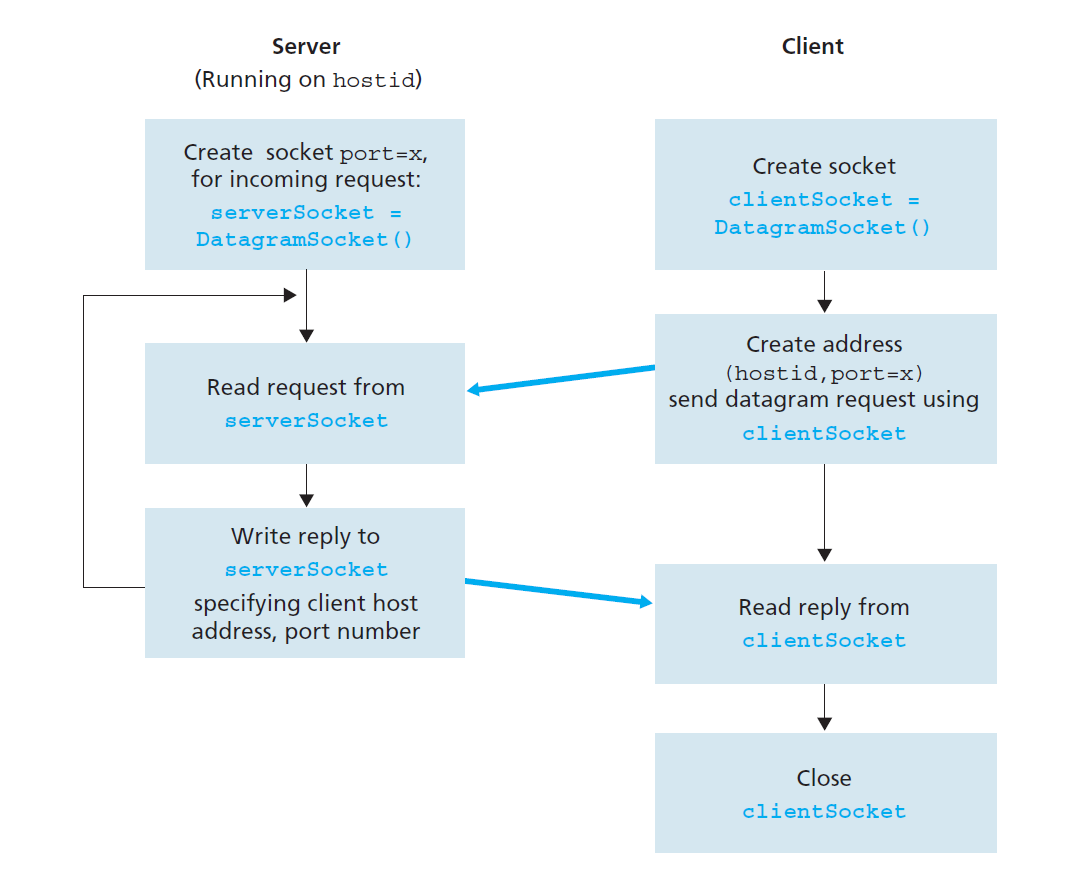
UDPClient.java
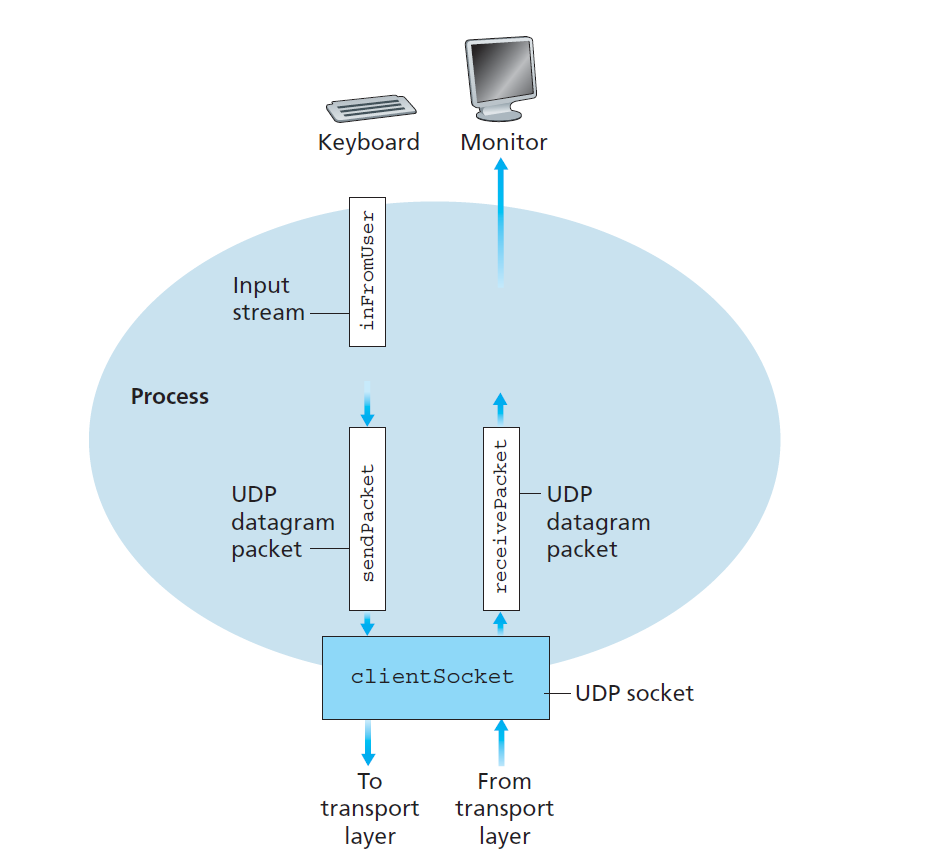
Socket programming with TCP
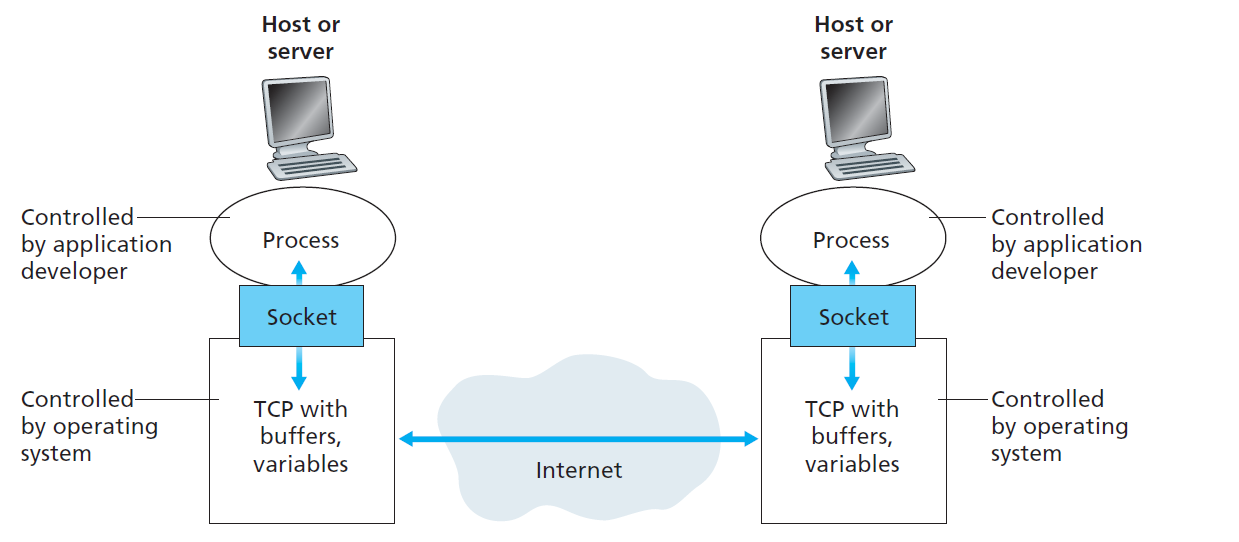
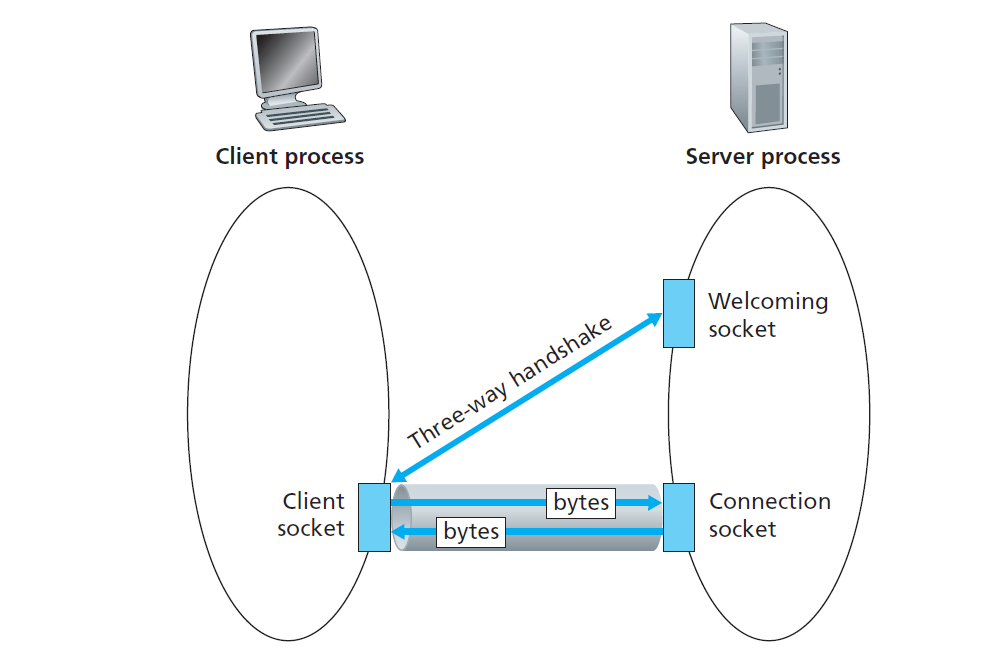
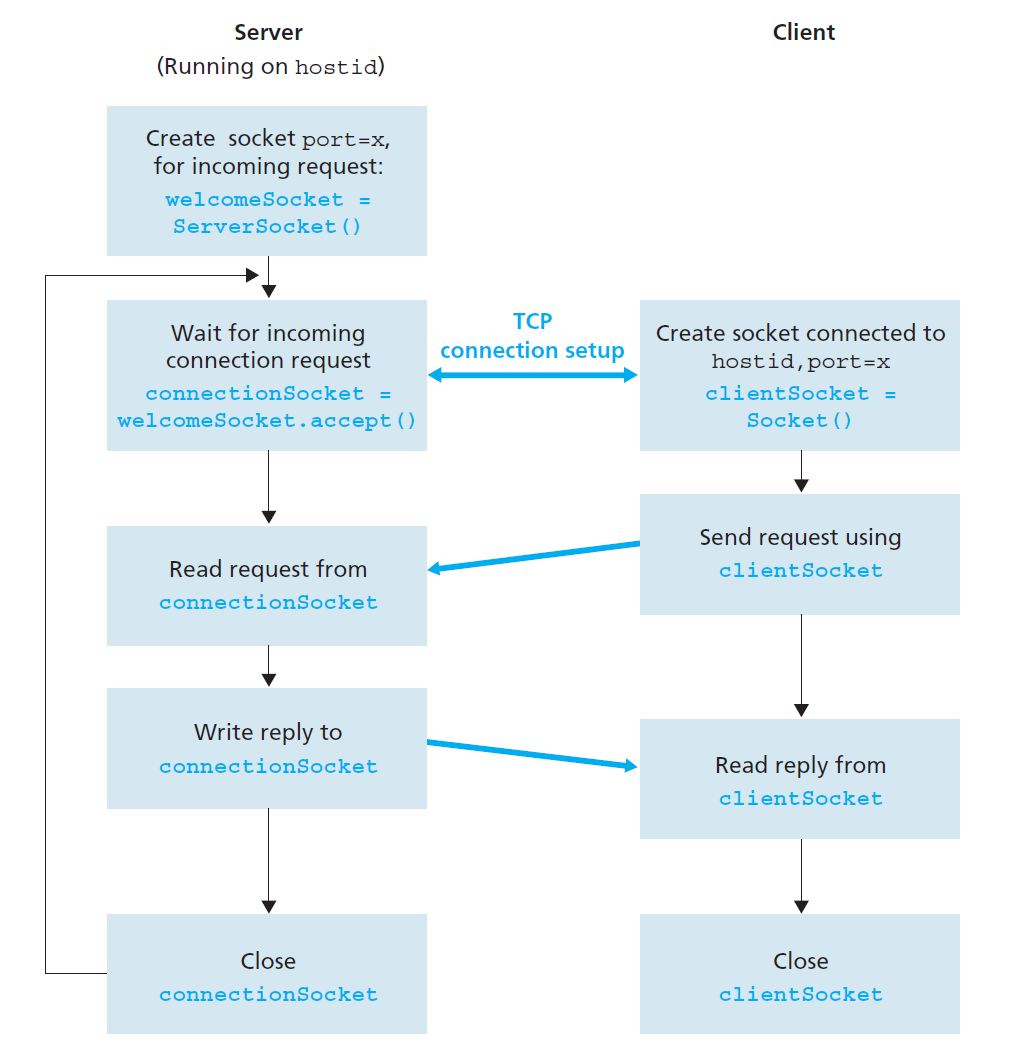
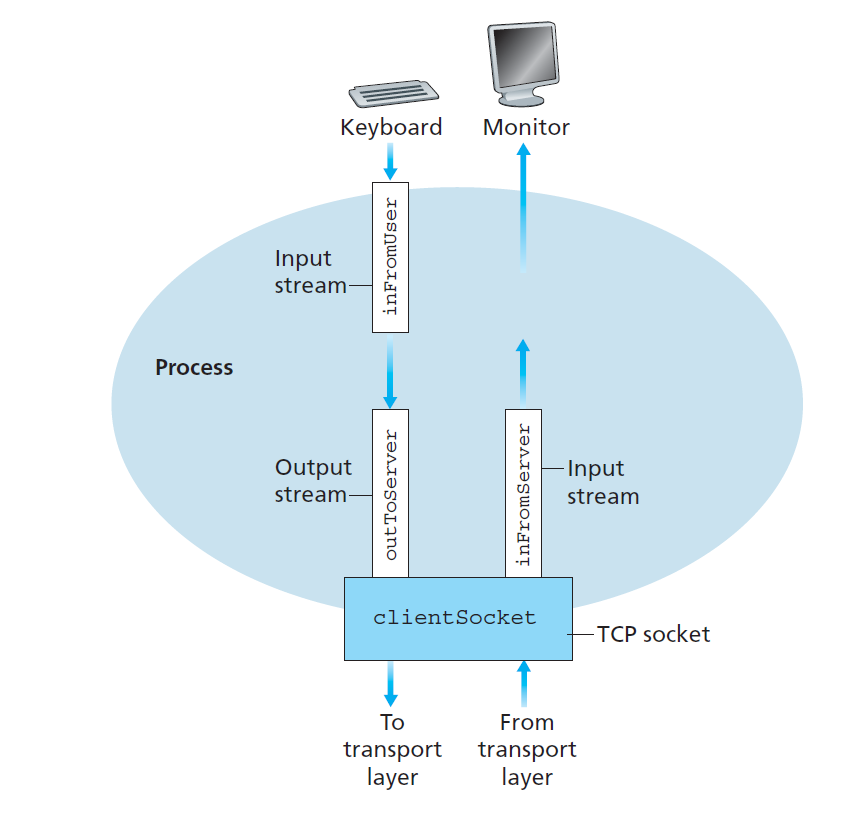
TCPClient.java
End-of-chapter exercises
R.1
List five nonproprietary Internet applications and the application-layer protocols that they use.
| Type | Protocol(s) |
|---|---|
| SMTP, IMAP, POP3 | |
| Web Browser | HTTP |
| File Transfer | FTP |
| Domain Name Resolution | DNS |
| Remote Terminal Access | SSH, Telnet |
R.2
What is the difference between network architecture and application architecture?(不太理解这里的 network architecture,默认和 application architecture 一样,都指的是在一个 OSI layer)
| Aspect | Network Architecture | Application Architecture |
|---|---|---|
| Definition | Describes the organization of network layers and components for data transmission. | Describes how application components interact to achieve specific functionalities. |
| Focus | Focuses on data transmission methods, routing, switching, and protocol stacks. | Focuses on the logical structure and communication patterns of applications. |
| Scope | Concerned with the entire network, including physical, data link, and network layers. | Concerned with the application layer and its communication between processes. |
| Examples | Virtual circuit networks, datagram networks. | Client-server model, P2P model (e.g., Skype, HTTP). |
R.6
Suppose you wanted to do a transaction from a remote client to a server as fast as possible. Would you use UDP or TCP? Why?
- 对于简单、小型且允许失败的事务(如状态查询、监控数据上报),可以选择UDP
- 对于大多数商业事务(如金融交易、数据库操作),应选择TCP,因为:
- 事务的完整性和正确性通常比速度更重要
- TCP的可靠性保障减少了应用层的复杂度
- 虽然TCP建立连接有开销,但对于事务的整体成功率和效率更有保障
- 在现代网络环境中,TCP连接建立的时延相对事务处理总时间通常可以接受
- 但题目要求 as fast as possible,所以还是用 UDP。
R.17
Print out the header of an e-mail message you have recently received. How many Received: header lines are there? Analyze each of the header lines in the message.
1 | |
There are \(2\) Received: header lines.
The first part is:
1 | |
Received: from codeforces.com (mx2.codeforces.com [77.234.215.195]): The email was sent from the Codeforces mail server with public IP.by newxmmxszgpub6-1.qq.com (NewMX): Received by QQ Mail’s mail server.- Using SMTP protocol,
Date\Time:Sat, 17 May 2025 00:47:55 +0800. - 其中的
mx2指的是 Mail eXchanger 2,即 codeforces 的第二台邮件交换 server。
The second part is:
1 | |
Received: from localhost (gauss.codeforces.com [192.168.10.103]): The email originated from the local server namedgauss.codeforces.com(internal IP).by codeforces.com (Postfix): Received by the main Codeforces mail server using Postfix.- Using ESMTP protocol.
邮件头传输顺序说明:邮件头按照邮件传输的相反顺序排列(最新的记录在最上面)。因此第二个
Received行实际上是邮件传输的起始点,第一个是最后一跳。时区分析:注意到两个头部行的时间戳不同:
- 第一个记录:
Sat, 17 May 2025 00:47:55 +0800(中国时区) - 第二个记录:
Fri, 16 May 2025 18:48:56 +0300(莫斯科时区MSK) 这说明邮件确实是从俄罗斯发往中国的,时间差符合时区差异。
- 第一个记录:
ESMTP vs SMTP的区别:第二个头部使用ESMTP(扩展SMTP)而不是普通SMTP,这表明使用了更多高级功能(如身份验证、加密等)。
R.22
What is an overlay network? Does it include routers? What are the edges in the overlay network? How is the query-flooding overlay network created and maintained?
An overlay network is a virtual network built on top of an existing physical network. It consists of logical connections (or “edges”) between nodes, which are typically end systems or hosts. These logical connections are established using the underlying physical network infrastructure.
Does it include routers?
No, an overlay network does not include physical routers. Instead, the nodes in the overlay network are typically end systems (e.g., computers, servers) that communicate directly with each other using logical links. The physical routers are part of the underlying network and are not explicitly represented in the overlay.What are the edges in the overlay network?
The edges in an overlay network are logical connections between nodes. These connections are established using the underlying physical network but are abstracted away from the physical topology. For example, in a peer-to-peer (P2P) network, the edges represent direct communication paths between peers.How is the query-flooding overlay network created and maintained?
A query-flooding overlay network is created by connecting nodes in a logical topology where each node knows a subset of other nodes (its neighbors). When a query is initiated, it is broadcasted (or “flooded”) to all neighboring nodes, which in turn forward the query to their neighbors, and so on.
Maintenance of the overlay involves:- Node discovery: New nodes join the network by discovering existing nodes and establishing connections.
- Topology updates: Nodes periodically update their neighbor lists to reflect changes in the network (e.g., nodes joining or leaving).
- Failure handling: Mechanisms are implemented to detect and recover from node or connection failures to ensure the overlay remains functional.
R.28
For the client-server application over TCP described in Section \(2.7\), why must the server program be executed before the client program? For the clientserver application over UDP described in Section \(2.8\), why may the client program be executed before the server program?
- For the TCP client-server application (Section \(2.7\)): The server program must be executed before the client because the server needs to create a socket, bind it to a port, and listen for incoming connections. If the client starts first, it will try to connect to the server’s port, but if the server isn’t running and listening yet, the connection will fail.
- For the UDP client-server application (Section \(2.8\)): The client program may be executed before the server because UDP is connectionless. The client can send a datagram to the server’s address and port even if the server isn’t running yet; the datagram may be lost, but the client doesn’t need to establish a connection first. When the server starts, it can immediately receive any new datagrams sent to its port.
P.4
Consider the following string of ASCII characters that were captured by Wireshark when the browser sent an HTTP GET message (i.e., this is the actual content of an HTTP GET message). The characters <cr><lf> are carriage return and line-feed characters (that is, the italized character string <cr> in the text below represents the single carriage-return character that was contained at that point in the HTTP header). Answer the following questions, indicating where in the HTTP GET message below you find the answer.
1 | |
Questions:
- What is the URL of the document requested by the browser?
- What version of HTTP is the browser running?
- Does the browser request a non-persistent or a persistent connection?
- What is the IP address of the host on which the browser is running?
- What type of browser initiates this message? Why is the browser type needed in an HTTP request message?
Answers:
a. What is the URL of the document requested by the browser? - http://gaia.cs.umass.edu/cs453/index.html.
b. What version of HTTP is the browser running? - HTTP/1.1
c. Does the browser request a non-persistent or a persistent connection? - Connection:keep-alive: a persistent connection.
d. What is the IP address of the host on which the browser is running? - The IP address of the host is not explicitly provided in the HTTP GET message. It would typically be determined by examining the network layer (IP) headers in the packet capture, which are not included in the provided data.
e. What type of browser initiates this message? Why is the browser type needed in an HTTP request message?
- The browser type is Mozilla/5.0 (Windows; U; Windows NT 5.1; en-US; rv:1.7.2) Gecko/20040804 Netscape/7.2 (ax).
- The browser type is included in the User-Agent header. It is needed in an HTTP request message to allow the server to tailor its response based on the browser’s capabilities, such as supported features, rendering engine, or platform-specific optimizations.
P.5
The text below shows the reply sent from the server in response to the HTTP GET message in the question above. Answer the following questions, indicating where in the message below you find the answer.
1 | |
Questions and Answers:
a. Was the server able to successfully find the document or not? What time was the document reply provided? - 200 OK: successfully find the document; Tue, 07 Mar2008 12:39:45
b. When was the document last modified? - Last-Modified: Sat, 10 Dec2005 18:27:46
c. How many bytes are there in the document being returned? - Ranges: bytes<cr><lf>Content-Length: 3874: \(3874\) bytes.
d. What are the first 5 bytes of the document being returned? Did the server agree to a persistent connection?
- First 5 bytes of the document:
<!doc(from the document content starting with<!doctype html public...). 所选的 HTTP 报文内容声明了Content-Type: text/html; charset=ISO-8859-1,该编码是单字节编码(每个字符 1 字节) - Persistent connection: Yes, the server agreed to a persistent connection as indicated by the header
Connection: Keep-Alive.
P.9
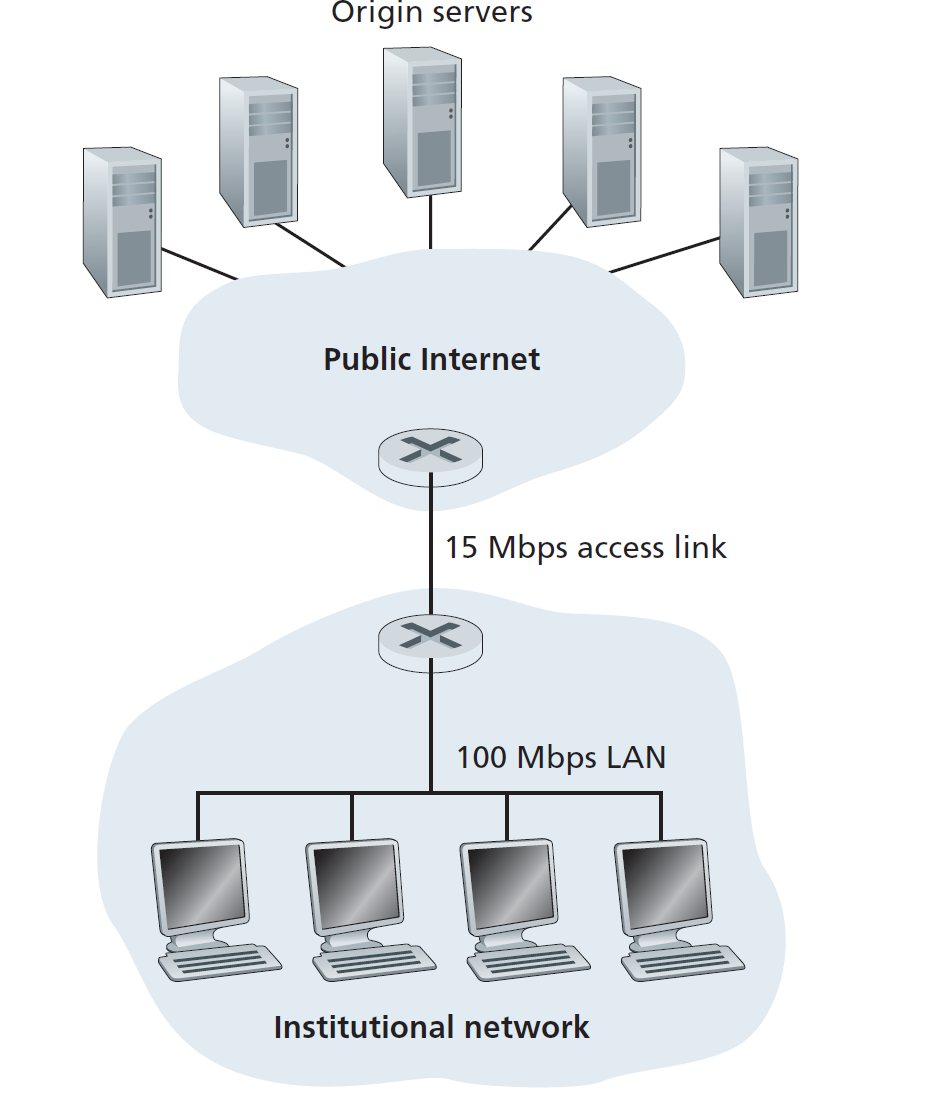
Consider Figure \(2.12\), for which there is an institutional network connected to the Internet. Suppose that the average object size is \(850,000\) bits and that the average request rate from the institution’s browsers to the origin servers is \(16\) requests per second. Also suppose that the amount of time it takes from when the router on the Internet side of the access link forwards an HTTP request until it receives the response is \(3\) seconds on average (see \(\text{Section}\) \(2.2.5\)). Model the total average response time as the sum of the average access delay (that is, the delay from Internet router to institution router) and the average Internet delay. For the average access delay, use \(\Delta / (1 - \Delta \beta)\), where \(\Delta\) is the average time required to send an object over the access link and \(\beta\) is the arrival rate of objects to the access link.
Complement: \(15\) Mbps access link and \(100\) Mbps LAN.
Questions and Answers:
a. Find the total average response time.
The total average response time is the sum of the average access delay and the average Internet delay.
Given data:
- Average object size: \(L = 850,000\) bits
- Access link rate: \(R = 15\) Mbps
- Request rate: \(\beta = 16\) requests/second
- Average Internet delay: \(3\) seconds
Calculate \(\Delta\): \[ \Delta = \frac{L}{R} = \frac{850,000}{15 \times 10^6} = 0.0567 \, \text{seconds} \]
Calculate average access delay: \[ \text{Access delay} = \frac{\Delta}{1 - \Delta \beta} = \frac{0.0567}{1 - (0.0567 \times 16)} = \frac{0.0567}{1 - 0.9072} = \frac{0.0567}{0.0928} \approx 0.611 \, \text{seconds} \]
Total average response time: \[ \text{Total response time} = \text{Access delay} + \text{Internet delay} = 0.611 + 3 = 3.611 \, \text{seconds} \]
b. Now suppose a cache is installed in the institutional LAN. Suppose the miss rate is \(0.4\). Find the total response time.
- Given data:
- Miss rate: \(0.4\)
- Hit rate: \(1 - 0.4 = 0.6\)
- Access delay (from part a): \(0.611\) seconds
- Internet delay: \(3\) seconds
- Calculate total response time with caching: \[ \text{Total response time} = (\text{Hit rate} \times \text{Access delay}) + (\text{Miss rate} \times (\text{Access delay} + \text{Internet delay})) \] Substituting values: \[ \text{Total response time} = 0.6 \times \frac{850000}{100 \times 10^6} + 0.4 \times (0.611 + 3) \] \[ \text{Total response time} = 0.0051 + 0.4 \times 3.611 = 1.4495 \, \text{s} \]
P.15
Question:
Read RFC \(5321\) for SMTP. What does MTA stand for? Consider the following received spam email (modified from a real spam email). Assuming only the originator of this spam email is malacious and all other hosts are honest, identify the malacious host that has generated this spam email.
1 | |
Answer:
最底部的 Received: 记录代表邮件的最初来源,即发件人最初连接的主机。
What does MTA stand for?
MTA stands for Mail Transfer Agent. It is a software application used to transfer email messages from one server to another using protocols such as SMTP.Identify the malicious host:
To identify the malicious host, we analyze theReceivedheaders in reverse order (from bottom to top), as eachReceivedheader represents a hop in the email’s journey.Received: from [58.88.21.177] by inbnd55.exchangeddd.com- This indicates that the email originated from the IP address
58.88.21.177.
- This indicates that the email originated from the IP address
Received: from asusus-4b96 ([58.88.21.177]) by barmail.cs.umass.edu- This confirms that the email was sent from the same IP address
58.88.21.177.
- This confirms that the email was sent from the same IP address
Received: from asusus-4b96 (localhost [127.0.0.1]) by barmail.cs.umass.edu- This shows that the email passed through a local host (
127.0.0.1) on thebarmail.cs.umass.eduserver.
- This shows that the email passed through a local host (
Received: from barmail.cs.umass.edu (barmail.cs.umass.edu [128.119.240.3]) by cs.umass.edu- This indicates that the email was forwarded by
barmail.cs.umass.edutocs.umass.edu.
- This indicates that the email was forwarded by
Based on the analysis, the malicious host is the originator of the email, which is the IP address
58.88.21.177. This is the source of the spam email.
P.18
Questions and Answers:
a. What is a whois database?
A whois database is a publicly accessible database that contains information about the registered owners of domain names and IP address blocks. It is maintained by domain registrars and regional internet registries (RIRs). The database provides details such as:
- The name and contact information of the domain owner or organization.
- The domain’s registration and expiration dates.
- The domain’s associated name servers.
- The registrar responsible for the domain.
The whois database is commonly used for administrative purposes, such as verifying domain ownership, resolving technical issues, or investigating malicious activities.
b. Use various whois databases on the Internet to obtain the names of two DNS servers. Indicate which whois databases you used.
DNS server 的名字,通常指的是域名形式的主机名。
通过在 ICANN Lookup 查询 BiliBili.com 得到其 Nameservers - NS3.DNSV5.COM - NS4.DNSV5.COM
通过在 DomainTools 查询 Baidu.com 得到其 Nameservers - NS1.BAIDU.COM (has 805 domains) - NS2.BAIDU.COM (has 805 domains) - NS3.BAIDU.COM (has 805 domains) - NS4.BAIDU.COM (has 805 domains) - NS7.BAIDU.COM (has 805 domains)
c. Use nslookup on your local host to send DNS queries to three DNS servers: your local DNS server and the two DNS servers you found in part (b). Try querying for Type A, NS, and MX reports. Summarize your findings.
我在终端输入的语句及其显示结果如下:
1 | |
总结: - www.baidu.com 和 baidu.com 不是同一个东西。具体来说后者涵盖范围更广。 - 一个 Nameserver 能有多个 Internet address。 - type=A 模式返回的是域名的 IPv4 地址。 - type=NS 模式返回的是 Nameserver 的名字和其 internet address。 - type=MS 模式返回的是该域名的邮件服务器主机名及优先级。
d. Use nslookup to find a Web server that has multiple IP addresses. Does the Web server of your institution (school or company) have multiple IP addresses?
查询 www.bilibili.com 得到结果如下,其有两个 IP address。
1 | |
貌似我们学校的 web server 只有一个 IP Address
1 | |
e. Use the ARIN whois database to determine the IP address range used by your university.
操作:
1 | |
这里的 IPv4 地址是子网地址吧?我在 rain 上查询查到了一个美国机构,而且网页也提醒我了 These addresses are in use by many millions of independently operated networks, which might be as small as a single computer connected to a home gateway, and are automatically configured in hundreds of millions of devices. 所以我用的是 IPv6 的地址,这个地址能查到,显示:Net Range 2001:da8:: - 2001:da8:ffff:ffff:ffff:ffff:ffff:ffff。
f. Describe how an attacker can use whois databases and the nslookup tool to perform reconnaissance on an institution before launching an attack.
An attacker 可以用 whois 和 nslookup 干如下的事情:
- whois 数据库:公开的域名/IP 注册信息数据库,可查询域名所有者、联系方式、DNS 服务器、IP 地址段等信息。
- nslookup 工具:DNS 查询工具,可用来获取域名解析记录(如 A、NS、MX、CNAME 等),进一步了解目标机构的网络结构和服务部署。
从而可以:
- 查询目标机构的域名,获取注册人、联系方式、注册商、DNS 服务器、IP 地址段等信息。
- 通过 whois 查询 IP 地址,了解目标机构的公网 IP 范围、网络归属、可能的子网划分。
- 利用这些信息,攻击者可以锁定攻击目标、寻找潜在的弱点(如联系邮箱、技术负责人等)。
- 查询目标机构域名的 A 记录,获取 Web 服务器等主机的 IP 地址。
- 查询 NS 记录,了解目标机构使用的权威 DNS 服务器,判断是否存在 DNS 攻击面。
- 查询 MX 记录,获取邮件服务器信息,可能用于钓鱼邮件、垃圾邮件攻击。
- 查询 CNAME、TXT 等记录,发现隐藏的服务、第三方集成、邮件安全策略等。
- 通过对不同子域名的批量查询,发现更多内部服务和主机。
进而:
- 绘制目标机构的网络拓扑和服务分布图。
- 寻找潜在的攻击入口(如暴露的服务器、邮件系统、DNS 服务等)。
- 为后续的漏洞扫描、社工攻击、钓鱼邮件等攻击手段做准备。
g. Discuss why whois databases should be publicly available.
whois数据库作为互联网基础设施的重要组成部分,其公开可用性具有多方面的价值与意义:
- 互联网透明度与问责制
- 提供域名和IP地址资源的所有权透明度,确保资源分配可追溯
- 建立互联网资源使用的公开记录,减少匿名滥用可能性
- 符合互联网作为公共资源的基本属性,保障公众知情权
- 技术协调与故障排除
- 网络管理员能迅速找到技术联系人解决网络问题
- 跨组织网络协作时提供必要的联络信息
- 在安全事件、网络中断等紧急情况下提供快速响应渠道
- 法律与知识产权保护
- 协助商标持有者保护其在线知识产权
- 为域名争议解决提供必要的所有权信息
- 帮助执法机构打击网络犯罪和识别不法行为
- 历史与文化因素
- 符合互联网早期建立的开放共享精神
- 继承了学术网络环境下的信任与协作文化
- 反映了互联网治理中的多方参与模式
- 安全与风险的平衡
- 虽然公开信息存在被滥用的风险,但安全通过隐蔽不是可持续策略
- 现代whois服务已引入数据隐私保护机制(如代理注册服务)
- 信息公开带来的集体安全收益通常超过个体风险
总之,whois数据库的公开可用反映了互联网基于透明、协作和问责的核心价值观,在保护隐私和维护网络健康运行之间寻求平衡。尽管存在被攻击者利用的风险,但其对互联网正常运行、问题排除和资源管理的价值仍然超过潜在风险。
P.20
Question and Answer: Suppose you can access the caches in the local DNS servers of your department. Can you propose a way to roughly determine the Web servers (outside your department) that are most popular among the users in your department? Explain.
To determine the most popular external Web servers among the users in my department, I would propose the following method:
- Access the local DNS server’s cache:
- The local DNS server maintains a cache of recently resolved domain names and their corresponding IP addresses.
- By accessing this cache, I can retrieve a list of domain names that users in my department have recently accessed.
- Filter out internal domain names:
- Remove any domain names that belong to the local department or organization.
- Count the frequency of external domain names:
- For each external domain name in the cache, count how many times it appears.
- This will give an estimate of how frequently users in the department access each external Web server.
- Identify the most popular Web servers:
- Sort the external domain names by their access frequency.
- The domain names with the highest counts represent the most popular external Web servers among the users in the department.
Explanation: This method works because the local DNS server’s cache reflects the browsing behavior of users in the department. By analyzing the cache, we can infer which external Web servers are most frequently accessed. However, this method has limitations, as it only provides a rough estimate and may not account for caching mechanisms in user devices or browsers.
P.22
Question:
Consider distributing a file of \(F = 15\) Gbits to \(N\) peers. The server has an upload rate of \(u_s = 30\) Mbps, and each peer has a download rate of \(d_i = 2\) Mbps and an upload rate of \(u\). For \(N = 10\), \(100\), and \(1,000\) and \(u = 300\) Kbps, \(700\) Kbps, and \(2\) Mbps, prepare a chart giving the minimum distribution time for each of the combinations of \(N\) and \(u\) for both client-server distribution and P2P distribution.
Answer:
To calculate the minimum distribution time for both client-server distribution and P2P distribution, we use the following formulas:
Client-Server Distribution: \[ t_{cs} = \max \left\{ \frac{N \cdot F}{u_s}, \frac{F}{d_i} \right\} \]
P2P Distribution: \[ t_{p2p} = \max \left\{ \frac{F}{u_s}, \frac{F}{d_i}, \frac{N \cdot F}{u_s + \sum_{i} u_i} \right\} \]
| \(N\) | \(u \, \text{Kbps}\) | \(t_{cs} \, \text{seconds}\) | \(t_{p2p} \, \text{seconds}\) |
|---|---|---|---|
| \(10\) | \(300\) | \(\max\{5000, 7500\} = 7500\) | \(\max\{500, 7500, 4545\} = 7500\) |
| \(10\) | \(700\) | \(\max\{5000, 7500\} = 7500\) | \(\max\{500, 7500, 4054\} = 7500\) |
| \(10\) | \(2,000\) | \(\max\{5000, 7500\} = 7500\) | \(\max\{500, 7500, 3000\} = 7500\) |
| \(100\) | \(300\) | \(\max\{50000, 7500\} = 50000\) | \(\max\{500, 7500, 25000\} = 25000\) |
| \(100\) | \(700\) | \(\max\{50000, 7500\} = 50000\) | \(\max\{500, 7500, 15000\} = 15000\) |
| \(100\) | \(2,000\) | \(\max\{50000, 7500\} = 50000\) | \(\max\{500, 7500, 6522\} = 7500\) |
| \(1,000\) | \(300\) | \(\max\{500000, 7500\} = 500000\) | \(\max\{500, 7500, 45455\} = 45455\) |
| \(1,000\) | \(700\) | \(\max\{500000, 7500\} = 500000\) | \(\max\{500, 7500, 20548\} = 20548\) |
| \(1,000\) | \(2,000\) | \(\max\{500000, 7500\} = 500000\) | \(\max\{500, 7500, 7389\} = 7500\) |
当节点数量较少(N=10)时,无论使用何种上传速率,两种分发方式所需时间相同,均受限于节点的下载速率。
当节点数量增加时,客户端-服务器模式的分发时间显著上升,而P2P模式在节点上传速率足够高时效率更高。
当节点上传速率达到2 Mbps时,P2P模式的分发时间在各种节点数下都可以保持在较低水平,这显示了P2P架构在大规模分发时的优势。